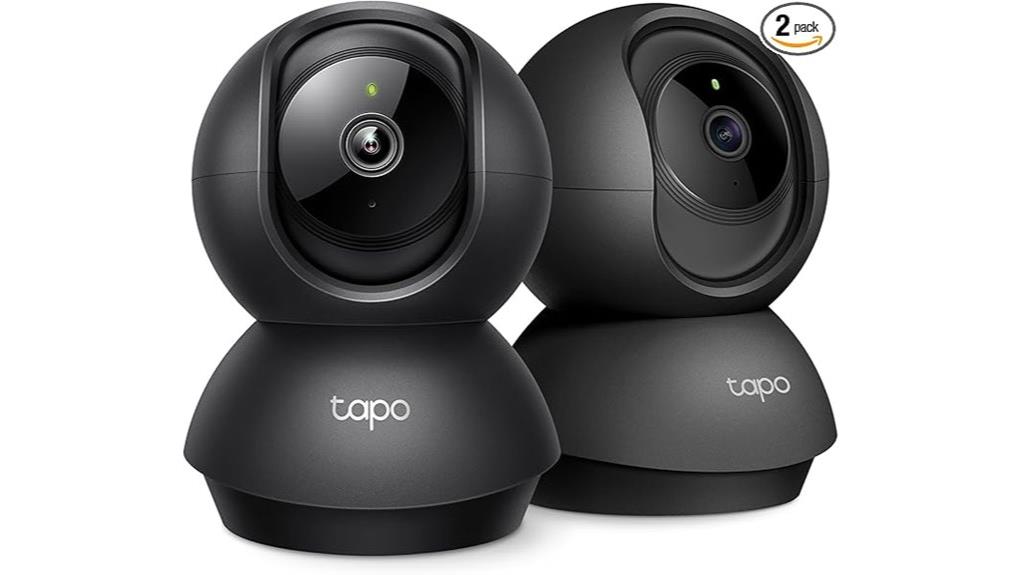
The Tapo 2K Indoor Camera delivers a robust array of features tailored for home security. With 2K high-definition video resolution and 360° pan and tilt functionality, it guarantees thorough coverage of any room. Integrated night vision allows for effective monitoring in low-light conditions, while two-way audio supports real-time communication. Users can opt for local or cloud storage, enhancing flexibility. With smart home compatibility, this device is positioned as a versatile tool for modern households. What other functionalities might enhance its appeal?
Key Takeaways
- The Tapo 2K offers exceptional 2K video quality, ensuring clear and detailed images for effective monitoring.
- Its pan and tilt functionality provides comprehensive 360° coverage, ideal for monitoring large spaces like nurseries.
- Integrated night vision ensures visibility in low-light conditions, making it suitable for nighttime monitoring.
- Two-way audio allows for seamless communication between parents and their baby, enhancing the monitoring experience.
- Flexible storage options include local microSD support and cloud storage, catering to different privacy and accessibility needs.
Essential Features of the Tapo 2K You Should Know
When considering the Tapo 2K Indoor Camera, it is essential to understand its key features that enhance home monitoring.
This device boasts 2K high-definition video quality, capturing detailed images for clear visibility. The pan and tilt functionality provides 360° horizontal and 114° vertical coverage, ensuring thorough room monitoring.
Integrated night vision allows for visibility in low-light conditions, while its two-way audio offers excellent audio clarity for conversations.
Compact in design, measuring 3.36 x 3.42 x 4.63 inches, this camera operates on a 2.4GHz Wi-Fi connection, making it both versatile and user-friendly for modern security needs.
How to Set Up and Use the Tapo 2K for Optimal Monitoring
Setting up the Tapo 2K Indoor Camera is a straightforward process that enables users to maximize its impressive monitoring capabilities.
Begin by selecting ideal camera placement, ensuring a clear view of the desired area. Connect the camera to a 2.4GHz Wi-Fi network through the Tapo app, which guides users step-by-step.
Customize notification settings to receive alerts for motion and person detection, enhancing security awareness.
The camera’s pan/tilt functionality allows for 360° coverage, while the two-way audio feature facilitates communication.
Why Is the Tapo 2K Perfect for Baby Monitoring?
The Tapo 2K Indoor Camera stands out as an exceptional choice for baby monitoring due to its advanced features tailored for safety and convenience. Its 2K high-definition video guarantees clarity, while the pan/tilt functionality provides 360° coverage of the nursery.
With integrated night vision, parents can monitor their baby even in low light. The camera also offers instant parent alerts for baby crying, allowing for prompt responses.
Two-way audio facilitates communication, enhancing the monitoring experience. These features collectively empower parents to maintain a watchful eye, assuring peace of mind and fostering a nurturing environment for their child.
Local vs. Cloud Storage for the Tapo 2K
Considering the storage options for the Tapo 2K Indoor Camera reveals distinct advantages of both local and cloud storage solutions.
Local storage benefits include the ability to use a microSD card of up to 512 GB, ensuring footage remains accessible without ongoing fees, thereby providing users with complete control over their data.
Local storage offers up to 512 GB via microSD, granting users complete data control without recurring fees.
In contrast, cloud storage drawbacks may involve subscription costs and potential privacy concerns, as videos are stored off-site.
Users must weigh these factors, choosing between the immediacy and autonomy of local storage versus the convenience and additional features of cloud storage, which offers a 30-day video history under Tapo Care.
How to Integrate the Tapo 2K With Smart Home Systems
Integrating the Tapo 2K Indoor Camera into existing smart home systems can greatly enhance home security and convenience. Its smart assistant compatibility with Amazon Alexa and Google Assistant allows for seamless voice command functionality.
This integration strengthens security system integration, enabling users to monitor their homes effortlessly. The camera’s 2K resolution and pan/tilt features provide extensive coverage, while motion detection alerts enhance responsiveness.
Additionally, its RTSP/ONVIF support facilitates compatibility with NVR systems, ensuring robust surveillance options. By incorporating the Tapo 2K, homeowners can enjoy a cohesive and liberated smart home experience, promoting both safety and ease of use.
Frequently Asked Questions
What Is the Warranty Period for the Tapo 2K Indoor Camera?
The Tapo 2K Indoor Camera offers a standard warranty coverage period of one year. Customers can rely on responsive customer support for assistance, ensuring a liberating experience with their security solutions and peace of mind.
Can the Tapo 2K Be Used Outdoors?
The Tapo 2K Indoor Camera, despite its advanced features, lacks outdoor suitability due to insufficient weather resistance. Like a bird in a cage, it thrives indoors but cannot brave the elements outside.
What Are the Power Requirements for the Tapo 2K?
The Tapo 2K requires a corded electric power source, consuming 9 volts and 5 watts. Its energy efficiency allows users to monitor effectively without excessive power demands, promoting a liberated approach to home surveillance.
Is the Camera Compatible With Third-Party Apps?
The camera offers limited app integration, primarily functioning within its ecosystem. While this may enhance user experience, those seeking broader compatibility with third-party apps might find it restrictive for their preferences and needs.
How Do I Reset the Tapo 2K to Factory Settings?
To perform a factory reset, hold the reset button for ten seconds, liberating the camera from its previous settings. This troubleshooting tip restores its pristine state, allowing for a fresh start and renewed functionality.
Conclusion
In conclusion, the Tapo 2K Indoor Camera stands as a versatile tool for home security and monitoring, combining advanced features like 2K video resolution and pan-and-tilt capabilities. Its two-way audio and night vision enhance user experience, particularly for families with infants. Whether choosing local or cloud storage, the camera adapts to various needs. With seamless smart home integration, the Tapo 2K is a valuable addition to any modern household, ensuring peace of mind like a vigilant guardian.