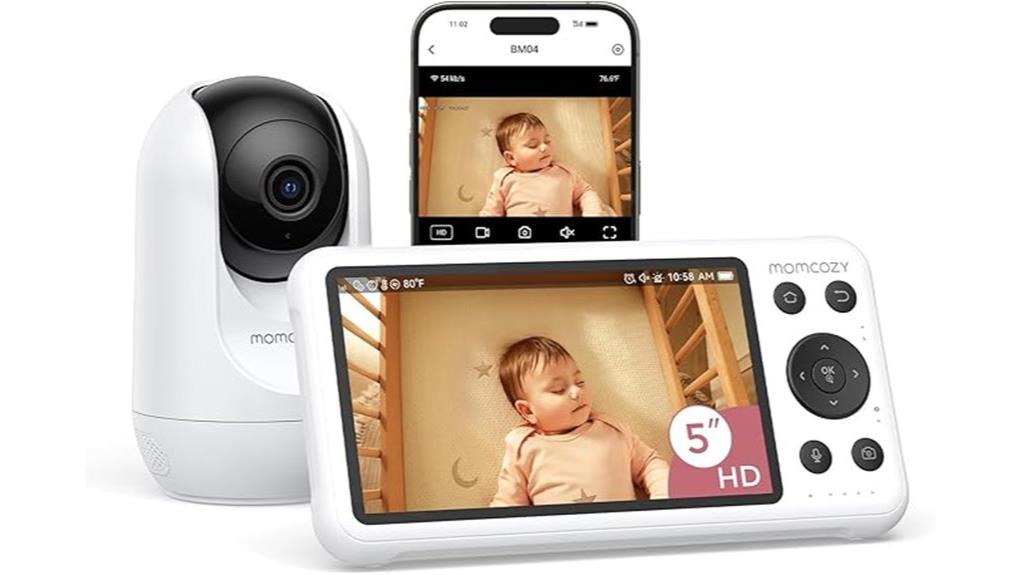
The Momcozy Smart WiFi Baby Monitor stands out with its 1080P resolution and a 360-degree viewing angle, providing parents with thorough visibility. It features a 5000mAh battery for extended use and infrared night vision for low-light conditions. Real-time alerts and customizable notifications enhance safety, while two-way communication offers emotional support. Additionally, the ability to share access with up to 20 family members promotes a collaborative approach to caregiving. These specifications invite further exploration of its practical applications.
Key Takeaways
- The Momcozy Smart WiFi Baby Monitor offers 1080P resolution and a 360-degree viewing angle for clear monitoring.
- It features a long-lasting 5000mAh battery, ensuring extended use without frequent recharging.
- Infrared night vision provides clarity in low-light conditions, making it ideal for nighttime monitoring.
- Real-time alerts and customizable notifications enhance safety and enable immediate parental responses.
- Two-way talk functionality allows parents to communicate with their baby from another room, providing emotional reassurance.
Essential Features for Choosing the Momcozy Smart WiFi Baby Monitor
When selecting a baby monitor, what essential features should one consider?
Camera quality is paramount; the Momcozy Smart WiFi Baby Monitor boasts 1080P resolution and a 360-degree viewing angle, ensuring clear visuals of the baby at all times.
Additionally, battery life plays an important role; with a robust 5000mAh battery, it supports extended monitoring without frequent recharging.
This model also includes infrared night vision, providing peace of mind during nighttime monitoring.
Real-time alerts for movement and two-way talk further enhance its functionality, making it a liberating choice for parents who seek both security and flexibility in monitoring their little ones.
Installation Guidelines for the Momcozy Baby Monitor
Installation of the Momcozy Smart WiFi Baby Monitor is straightforward, guaranteeing parents can swiftly set up the device for ideal use.
For best camera placement, it is recommended to mount the monitor at least 0.6 meters (24 inches) above the crib, allowing for a clear view of the baby. Additionally, keeping the camera within 5 meters (16 feet) horizontally from the crib enhances night vision capabilities.
To secure stability and security, follow specific mounting tips provided in the instruction manual, which includes a wall mount set. This thoughtful installation process facilitates effective monitoring, promoting peace of mind for parents.
Understanding Monitoring Features: Real-Time Alerts and Two-Way Talk
The Momcozy Smart WiFi Baby Monitor is equipped with essential monitoring features that enhance parental peace of mind. With real-time alerts, parents can customize notifications for motion detection, ensuring they are informed when their baby rolls over or leaves a designated area. The two-way talk functionality promotes communication clarity, allowing parents to soothe their child from another room.
| Feature | Description | Benefit |
|---|---|---|
| Alert Customization | Tailor alerts to specific needs | Personalized monitoring |
| Real-Time Notifications | Instant updates via app | Immediate response capability |
| Two-Way Talk | Communicate directly with the baby | Emotional reassurance |
| Safe Zone Alerts | Notifications for off-limits areas | Enhanced safety and security |
Choosing Between Continuous and Motion-Activated Recording
Choosing between continuous and motion-activated recording options becomes essential for parents seeking to optimize their monitoring experience.
Continuous recording offers uninterrupted video storage, allowing parents to review every moment, which is beneficial for detailed oversight.
However, motion-activated recording is tailored for those preferring to conserve video storage, capturing only significant movements. This option reduces unnecessary footage, making it easier to manage recordings.
Ultimately, recording preferences hinge on the desired balance between thorough monitoring and efficient storage.
Parents should consider their unique needs, weighing the advantages of each method against their lifestyle and the importance of specific moments in their baby’s development.
Sharing Access With Family Members for the Momcozy Baby Monitor
Sharing access with family members for the Momcozy Smart WiFi Baby Monitor enhances the overall monitoring experience, enabling loved ones to stay connected with the baby’s activities.
With the ability to share access permissions with up to 20 family members, everyone can participate in ensuring the child’s safety. This feature fosters family connectivity, allowing relatives to view the live feed and receive alerts, enhancing peace of mind.
Each member can monitor the baby’s environment, respond through two-way talk, and receive notifications about any movement or safe zone breaches, creating a collaborative atmosphere in caregiving while ensuring the baby’s well-being.
Frequently Asked Questions
Is the Momcozy Monitor Compatible With Both iOS and Android Devices?
The monitor is compatible with both iOS and Android devices, providing users with seamless access to high video quality. Its intuitive user interface enhances the experience, ensuring liberation in monitoring their baby’s safety and well-being.
How Long Does the Battery Last on a Full Charge?
A fully charged battery typically lasts up to 12 hours, showcasing impressive battery performance. With a charging time of around 3 hours, it offers parents the liberation to monitor their baby without constant interruptions.
Can I Use the Monitor Without Wifi?
Yes, the monitor supports non-WiFi connectivity options, allowing users to utilize its features without relying on internet access. This flexibility empowers parents to maintain effective monitoring regardless of their home network availability.
What Is the Warranty Period for the Momcozy Monitor?
The warranty period for the monitor is typically one year, covering defects in materials and workmanship. Customers are encouraged to reach out to customer support for assistance regarding monitor features and warranty claims.
How Do I Reset the Monitor to Factory Settings?
To reset the monitor to factory settings, hold the reset button for ten seconds. This monitor troubleshooting tip restores original configurations, providing liberation from previous settings and ensuring a fresh start for peak performance.
Conclusion
In a world where parenting tools resemble science fiction, the Momcozy Smart WiFi Baby Monitor stands out with its advanced features. With 1080P resolution and a 360-degree viewing angle, it guarantees no corner is overlooked. The 5000mAh battery and infrared night vision provide dependable monitoring day and night. Real-time alerts and two-way communication enhance caregiving, while the option to share access with 20 family members fosters collaboration. This monitor offers extensive support for modern parents seeking peace of mind.