Disclosure: As an Amazon Associate, we earn from qualifying purchases. If you click a link on this page and make a purchase, we may receive a small commission at no extra cost to you.
Choosing a baby monitor often comes down to one decision: do you want remote phone access, or a simple local screen that stays off the internet? The Infant Optics DXR-8 PRO is built for the second group, using a dedicated 5-inch parent unit and a direct wireless connection instead of WiFi or an app. This review explains how its 720p video, Active Noise Reduction, camera controls, lenses, battery, and multi-camera support work in daily use. Its main strengths are privacy-minded local monitoring and fast controls, while its main limits are short screen-on runtime and no viewing away from home.
Quick Verdict
Rating: 8/10, recommended with caveats
Best For: Parents who want a private, no-WiFi video monitor with a dedicated screen and flexible camera views.
Bottom Line: The DXR-8 PRO gives you clear 720p viewing, useful noise filtering, and support for up to four cameras without relying on the internet. Its 6-hour screen-on battery estimate and lack of phone access make it less suitable for buyers who want all-day portability or viewing away from home.
| Specification | Detail |
|---|---|
| Brand | Infant Optics |
| Model | DXR-8 PRO |
| Product type | Indoor digital video baby monitor |
| Display | 5-inch TFT color display, 1280 × 720 |
| Monitor dimensions | 167 × 81 × 20 mm |
| Camera dimensions | 105 × 66 × 80 mm including the antenna |
| Wireless system | 2.4 GHz FHSS direct connection, no WiFi, app, or cloud account |
| Maximum stated range | Up to 1,000 feet with clear line of sight and no obstructions |
| Camera expansion | Up to four compatible DXR-8 PRO cameras total |
| Camera movement | Remote pan, tilt, and digital zoom; 135° left and right, 95° up and 25° down |
| Night vision | Eight infrared LEDs with a low-light sensor |
| Parent-unit tools | Sound-activated LED bar, room-temperature display, feeding timer, alarm, and multi-camera scan mode |
| Operating temperature | 32°F to 104°F (0°C to 40°C) |
| Audio | Two-way talk and Active Noise Reduction |
| Battery | Rechargeable lithium-ion battery, user-replaceable |
| Battery estimate | Up to 6 hours with the screen on or 10 hours in standby mode |
| Full charge time | About 7 hours |
| Included lens options | Aluminum lens hood and optical zoom lens; wide-angle lens sold separately |
| Package contents | One camera, one parent monitor, rechargeable battery, two power adapters, USB cable, zoom lens, mounting hardware, and manual |
| Safety note | Indoor use only; keep the camera and cords at least 3 feet from the crib or playpen |
| Limited warranty | One year for the original user in the United States, subject to the manual’s terms |
Key Takeaways
- The dedicated parent unit works without WiFi, an app, or cloud storage.
- The 5-inch 720p screen and remote camera controls make routine nursery checks easy.
- A sound-activated LED bar, room-temperature display, feeding timer, alarm, and scan mode add useful parent-unit controls.
- Active Noise Reduction targets steady sounds such as fans, air purifiers, heaters, and air conditioners.
- The system can pair with up to four compatible DXR-8 PRO cameras, although this standard model plays audio from one camera at a time.
- The included optical zoom lens improves detail from farther away, while the optional wide-angle lens covers more of a room with some distortion.
- The stated battery estimate is up to 6 hours with the screen on, so many families will keep the parent unit near a charger overnight.
What Is the Infant Optics DXR-8 PRO?
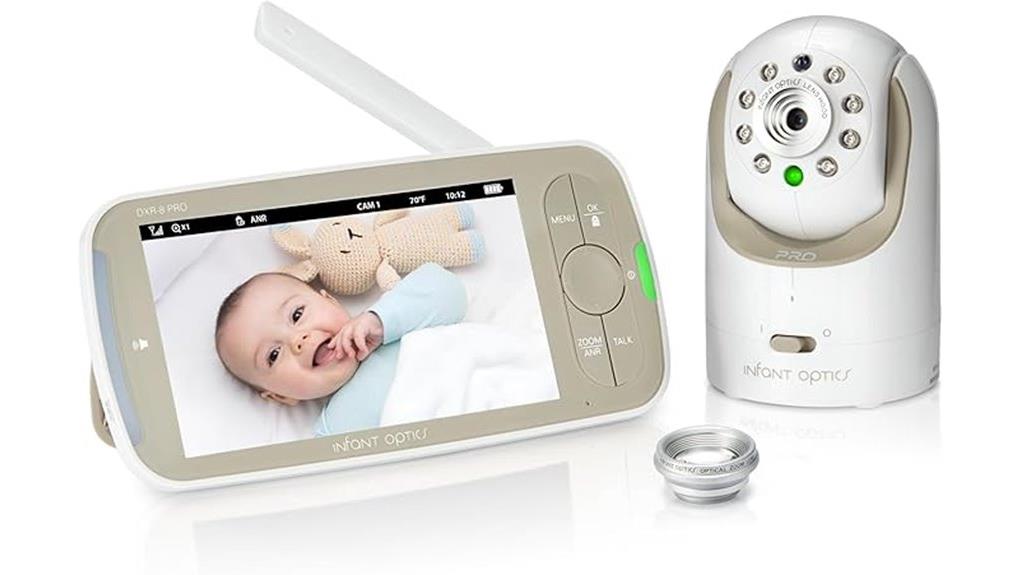
The Infant Optics DXR-8 PRO is a non-WiFi baby monitor with one motorized camera and a dedicated 5-inch parent unit. You control the camera, hear nursery audio, use two-way talk, and check video without pairing a phone or creating an online account.
The package includes the camera, parent monitor with rechargeable battery, camera and monitor power adapters, a USB power cable, an optical zoom lens, mounting hardware, and the user manual. The camera’s aluminum lens hood works for standard viewing, while the included optical zoom lens helps when the camera must sit farther from the crib. The parent unit also provides a sound-activated LED bar, room-temperature display, feeding timer, alarm, and scan mode for systems with two or more cameras.
Who Should Buy It?
Best For
- Parents who prefer a dedicated screen instead of a phone app.
- Homes that need remote pan, tilt, zoom, and flexible lens choices.
- Families planning to add compatible cameras while monitoring one feed at a time.
Skip If
- You need to view the nursery from work, travel, or anywhere outside the monitor’s local range.
- You want a parent unit that can run all day with the screen continuously on.
- You need split-screen viewing and simultaneous audio from two cameras.
Before You Buy: The standard DXR-8 PRO can connect to four cameras, but it shows and plays audio from one camera at a time. Compare the DXR-8 PRO SS if simultaneous two-camera viewing and audio are essential.
Key Features of the Infant Optics DXR-8 PRO
5-Inch 720p Display and Camera Control
The 1280 × 720 parent screen is large enough to show sleeping position, movement, and basic nursery details without using your phone. Buttons on the parent unit control camera direction, zoom, volume, brightness, talk mode, and camera selection.
The camera turns 135 degrees to either side, tilts 95 degrees upward, and tilts 25 degrees downward. That movement helps when your child shifts across a crib or begins using more of the room, but camera placement still determines how much of the sleep space you can see.
Night Vision and Two-Way Talk
Eight infrared LEDs and a low-light sensor support automatic night viewing. The image changes to monochrome in darkness, which is normal for infrared monitoring. You can also press and hold the talk button to speak through the camera’s speaker.
Two-way talk is useful for a quick reassurance or for asking another caregiver to check the room. It should not replace an in-person check when your baby may need feeding, repositioning, medical attention, or hands-on care.
Sound-Activated LEDs, Temperature, and Timers
The sound-activated LED bar gives you a visual cue when nursery audio rises, including when the screen is off or the speaker is muted. The parent unit also shows room temperature and includes a feeding timer and alarm, which can reduce the number of separate reminders you keep nearby.
These are convenience tools, not safety systems. Check the room directly if the temperature reading seems unusual or your child may need care, and do not rely on the timer or LED bar as a substitute for adult supervision.
How the DXR-8 PRO Handles Privacy
The DXR-8 PRO sends video and audio directly between its camera and parent unit over a 2.4 GHz FHSS connection. It does not require WiFi, a mobile app, a user account, or cloud storage. This design avoids the internet-facing login and cloud account required by many app-based monitors.
No wireless product should be described as impossible to intercept. Infant Optics does not publicly identify a specific encryption algorithm in the current manual or listing. The practical privacy advantage is the closed local system, not a promise that any device is invulnerable.
Setup, Controls, and Battery Life
Initial setup is simple because the included camera and parent unit are paired for local use. Place the camera where it has a clear view, connect both units to their supplied power adapters, switch them on, and test video, audio, camera movement, and reception before relying on the system.
The manual lists up to 6 hours of battery use with the screen on and up to 10 hours in standby mode. A full charge takes about 7 hours. Real use can be shorter when brightness, volume, signal strength, temperature, and frequent camera adjustments increase power demand.
The battery is user-replaceable, which can extend the parent unit’s useful life after normal battery wear. Use only the correct replacement type, and stop using the monitor if the battery swells, leaks, overheats, or damages the case.
How Active Noise Reduction Works
Active Noise Reduction, or ANR, is designed to reduce steady background sounds that can dominate a baby monitor’s audio. Infant Optics lists fans, air purifiers, heaters, and air conditioners as examples. That filtering can make fussing and crying easier to distinguish in rooms with constant mechanical noise.
ANR does not remove every sound, and it should not be treated as a safety alert system. Irregular noises may remain audible, and aggressive filtering can change how some background sounds are presented. Test ANR with your nursery’s usual fan or sound machine, then choose the setting that gives you the clearest useful audio.
Choosing the Right Lens for Your Needs
The camera arrives with an aluminum lens hood for standard nursery viewing. The included optical zoom lens makes distant objects appear closer, so it is useful when furniture placement or cord-safety rules require the camera to sit farther from the crib.
The optional wide-angle lens expands peripheral coverage for a larger room or play area. The manual notes that this wider view introduces slight distortion and reduced clarity. It is better for seeing more of the room than for examining fine detail.
Pro Tip: Set the camera in its permanent position before choosing a lens. Use the standard view first, add the optical zoom lens when the crib looks too distant, and consider the optional wide-angle lens only when room coverage matters more than close detail.
Baby Safety Notes
Keep the camera, power cords, lenses, and mounting parts out of your child’s reach. The manufacturer instructs you to keep cords at least 3 feet, or 0.9 meter, from the crib or playpen and never place the camera or cord inside or near the sleep space. The lens hood, zoom lens, and mounting parts are small enough to create a choking risk if a child reaches them.
Use the supplied power adapters, install the camera no higher than 2 meters, and keep the unit away from water. Stop using a battery that swells, leaks, overheats, smells unusual, or damages the parent-unit case.
This monitor is intended for indoor use and is not a medical device. It cannot detect every silent movement or replace regular adult supervision. Test the picture, audio, and reception after installation and whenever you move the camera, especially in homes with concrete walls or other signal barriers.
How It Performs in Real Use
For Overnight Monitoring
The large parent screen, infrared night vision, and ANR suit overnight checks from another room. Standby mode extends battery time by turning off the screen while keeping audio available, but the standard model does not use a phone-style push notification system.
For Naps and Daily Room Checks
Remote pan and tilt let you adjust the view without entering the nursery. The dedicated controls respond faster than opening an app, and the local system continues working when your home internet is down. You still need to stay within the monitor’s usable radio range.
For Multi-Room Use
You can add compatible DXR-8 PRO cameras and use scan mode to rotate through as many as four channels. This works for siblings or a nursery plus playroom within the same local system. It does not create remote access, and the regular DXR-8 PRO shows and plays audio from one camera at a time rather than displaying two feeds together.
For Travel
The system can travel without depending on hotel WiFi, but you must pack the supplied adapters, camera, parent unit, and any lens you use. You can also keep a compatible spare camera at a grandparent’s home and pair it locally when you visit. Test the setup after arrival, secure every cord, and confirm that local outlet requirements match the supplied power equipment.
Setup Tips and Common Mistakes
- Test the exact location: Check video, audio, camera movement, and reception after mounting the camera.
- Protect the sleep space: Keep every cord and small lens part outside your child’s reach and at least 3 feet from the crib or playpen.
- Allow charging time: Charge the parent unit before the first overnight use because a full charge can take about 7 hours.
- Use compatible hardware: The original DXR-8 camera and monitor are not interchangeable with the PRO series. DXR-8 PRO and DXR-8 PRO SS cameras are compatible with PRO-series parent units.
- Use the supplied power equipment: Third-party charging cables or high-wattage adapters can overheat the charging components.
- Plan for walls: The 1,000-foot figure applies to unobstructed line of sight. Indoor walls, floors, appliances, and nearby wireless devices can reduce range.
- Do not depend on ANR alone: Listen with ANR on and off during setup so you know how your nursery sounds in both modes.
Pros and Cons
Pros
- Works without WiFi, an app, cloud storage, or subscription fees.
- 5-inch 720p parent screen with remote pan, tilt, and zoom controls.
- ANR reduces common steady nursery background noise.
- Included optical zoom lens supports farther camera placement.
- Expandable to four compatible cameras with a user-replaceable battery.
Cons
- No phone viewing or access outside the monitor’s local wireless range.
- Up to 6 hours of screen-on battery life may require frequent charging.
- The standard model does not provide split-screen viewing or simultaneous two-camera audio.
Is It Worth the Price?
The DXR-8 PRO sits in the premium part of the dedicated baby-monitor market. Its value comes from the larger 720p screen, motorized camera, included optical zoom lens, ANR, replaceable battery, and multi-camera expansion rather than app-based extras.
It is worth considering when privacy, quick local controls, and dependable monitoring during internet outages matter more than remote phone viewing. It offers less value if you need long screen-on battery life, smart alerts, recordings, or access while you are away from home.
How It Compares to Alternatives
The Infant Optics DXR-8 PRO SS is the closer alternative for families who need two included cameras, split-screen viewing, and simultaneous dual audio. The standard DXR-8 PRO costs you those multi-view features but still supports up to four cameras and works well when you usually watch one room at a time.
A WiFi model such as the Nanit Smart Baby Monitor makes more sense when you need phone viewing from anywhere, smart notifications, or video history. Some connected features and history depend on an optional membership, while the DXR-8 PRO is the better fit when you want a self-contained screen, no cloud account, and fewer setup steps.
Frequently Asked Questions
What is the range of the Infant Optics DXR-8 PRO?
The manufacturer states up to 1,000 feet with clear line of sight and no obstructions. Indoor range is usually shorter because walls, floors, appliances, and other wireless devices can weaken the signal.
Can you add more cameras to the DXR-8 PRO?
Yes. The parent unit has four selectable camera channels and can support up to four compatible PRO-series cameras total. The original DXR-8 hardware is not interchangeable with the PRO series, while DXR-8 PRO and DXR-8 PRO SS cameras are compatible with PRO-series parent units.
Can you view the monitor on a phone?
No. The DXR-8 PRO does not connect to WiFi, an app, or the cloud. You view the camera only on its dedicated parent unit within the local wireless range.
How long does the battery last?
The current manual lists up to 6 hours with the screen on and up to 10 hours in standby mode. Battery condition, brightness, volume, signal strength, and frequent camera control can reduce actual runtime.
Does the package include the wide-angle lens?
No. The package includes the standard aluminum lens hood and an optical zoom lens. The wide-angle lens is a separate purchase and trades some clarity for a broader room view.
Does Active Noise Reduction block your baby’s sounds?
ANR is intended to reduce constant mechanical background noise, not silence the nursery. Test it with your usual fan, purifier, heater, air conditioner, or sound machine so you can confirm that important sounds remain clear.
How far should the camera and cord be from the crib?
Keep the camera and every cord out of your child’s reach. Infant Optics instructs you to keep cords at least 3 feet, or 0.9 meter, from the crib or playpen and never place them inside or near the sleep space.
What warranty comes with the DXR-8 PRO?
The current manual states a one-year limited warranty for the original user from the purchase date. It applies only in the United States and excludes batteries, misuse, accidents, unauthorized alterations, and other conditions listed in the warranty terms.
The Bottom Line
The Infant Optics DXR-8 PRO is a strong choice when you want a private local monitor with a large dedicated screen, useful audio filtering, flexible camera control, and room to add cameras later. Skip it when phone access, split-screen viewing, simultaneous dual audio, or long screen-on battery life matters more than its no-WiFi design.
Ready to Buy?
Check the latest price, seller, and package details before you decide.