Disclosure: As an Amazon Associate, we earn from qualifying purchases. If you click a link on this page and make a purchase, we may receive a small commission at no extra cost to you.
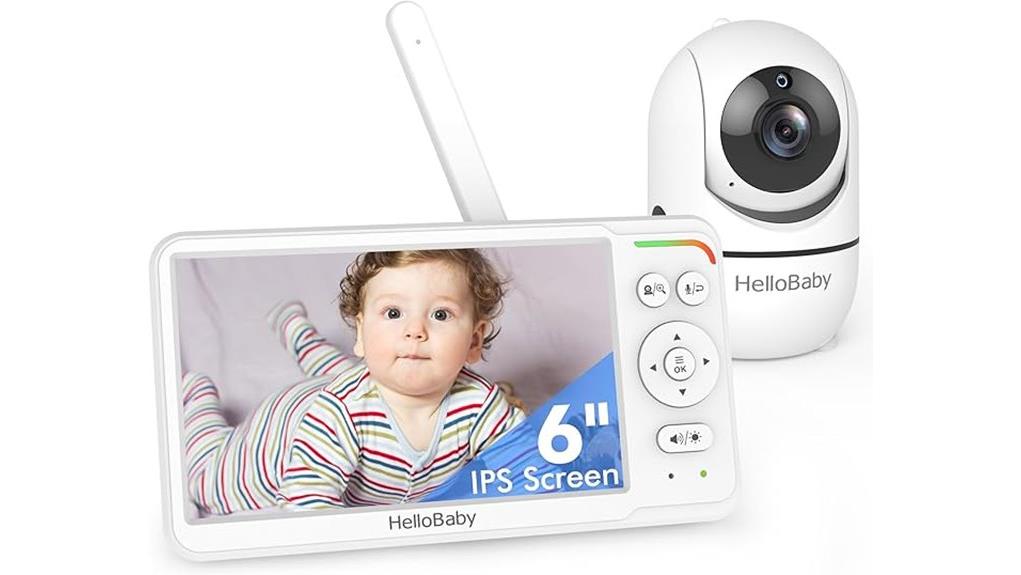
A baby monitor should help you check the nursery without adding a complicated app, account, or cloud connection. The HelloBaby HB6560 takes that simpler route with a dedicated 6-inch parent unit, a direct 2.4GHz FHSS connection, and a camera you can pan and tilt remotely. Its large screen, long stated battery range, and two-camera split-screen support make it practical for many homes. The main tradeoffs are equally clear: you cannot view it from your phone, the camera must stay plugged in, and expansion is limited to two cameras total.
Quick Verdict
Rating: 8.4/10, recommended with caveats
Best For: Parents who want a large-screen, no-WiFi monitor for home, travel, or two-room viewing.
Bottom Line: The HB6560 gives you a roomy display, remote camera control, night vision, and useful sound and temperature tools without relying on your phone. Skip it if you need remote viewing outside the monitor’s local range or more than two cameras.
Key Takeaways
- The HB6560 uses a direct 2.4GHz FHSS connection, so video does not depend on your home WiFi, a phone app, or a cloud account.
- The parent unit has a 6-inch IPS screen, while the camera offers remote 355° pan, 120° tilt, and 2x digital zoom.
- HelloBaby states a 16 to 30-hour battery range for the parent unit, depending on screen use and power-saving settings.
- Infrared night vision, two-way talk, eight lullabies, a room-temperature display, sound-level lights, and VOX mode cover the main daily monitoring needs.
- The system supports split-screen viewing with up to two HB6560 cameras total, not two additional cameras.
- The camera needs continuous AC power and is not water-resistant, so it should remain indoors and away from your child’s reach.
Key Specifications
| Specification | Detail |
|---|---|
| Brand | HelloBaby |
| Model | HB6560 |
| Product type | Non-WiFi video baby monitor with dedicated parent unit |
| Display | 6-inch IPS screen |
| Connectivity | Direct 2.4GHz FHSS connection, no WiFi or app required |
| Camera movement | Remote 355° pan and 120° tilt |
| Zoom | 2x digital zoom |
| Night monitoring | Automatic infrared night vision |
| Parent-unit battery | Manufacturer-stated 16 to 30 hours, depending on use |
| Claimed range | Up to 1,000 feet in open-air conditions |
| Audio and alerts | Two-way talk, VOX mode, sound-level indicator, temperature display and alerts |
| Soothing sounds | Eight lullabies |
| Camera expansion | Up to two compatible HB6560 cameras total with split-screen viewing |
| Mounting | Tabletop or wall mounting |
| Power | Rechargeable parent unit; camera requires AC power |
| Included items | Parent unit, camera, two power adapters, instruction manual, and mounting hardware |
| Warranty | One-year standard warranty |
What Is the HelloBaby HB6560?
The HelloBaby HB6560 is a local video monitoring system built around a dedicated parent screen and one indoor camera. It does not connect to your phone or home router. Instead, the camera sends audio and video directly to the parent unit over a 2.4GHz FHSS link.
This setup suits you when you want simple controls and fewer accounts to manage. The 6-inch screen is larger than the 5-inch displays found on many basic monitors, and remote pan, tilt, and zoom let you adjust the view without entering the room.
The package starts with one camera. You can add a compatible second HB6560 camera for split-screen monitoring, which is useful for two children, a nursery plus play area, or a crib plus floor space.
Who Should Buy It?
Best For
- Parents who prefer a dedicated screen instead of a phone app.
- Grandparents or caregivers who need simple, plug-and-play controls.
- Families monitoring one room now with the option to add a second compatible camera later.
Skip If
- You need to view the camera from work, another city, or anywhere beyond the local radio range.
- You want recording, cloud storage, motion history, or phone notifications.
- You need more than two cameras on one parent unit.
Before You Buy: The camera is not battery-powered or water-resistant. It needs a nearby outlet, and its power cord must remain well outside your child’s reach.
No-WiFi Connection and Privacy
The HB6560 keeps its video feed off your home WiFi and does not require an app, login, or cloud subscription. That reduces exposure to internet account breaches and avoids problems caused by router outages or app updates.
The system uses 2.4GHz FHSS, which changes frequencies during transmission. This is a practical privacy advantage over an internet-connected camera, but no wireless product should be described as impossible to intercept. You should still keep the parent unit secure and use the monitor only as directed.
Because the connection is local, you cannot check the feed when you leave the property. That limitation may be helpful if privacy is your priority, but it is a poor fit when remote access is essential.
6-Inch IPS Screen and Camera Coverage
The 6-inch IPS parent unit gives you a broad view without tying up your phone. An IPS panel generally keeps the picture easier to see from different viewing angles, which helps when the screen sits on a nightstand or kitchen counter.
From the parent unit, you can move the camera through 355° of horizontal pan and 120° of vertical tilt. The 2x digital zoom helps you check a smaller part of the scene, although digital zoom will not add new image detail.
Remote movement is most useful after your child becomes active. You can follow a toddler across a play area or adjust the camera after someone shifts the crib-side setup without entering the room.
Battery Life, VOX Mode, and Night Vision
HelloBaby states that the rechargeable parent unit runs for 16 to 30 hours, depending on how you use the screen and power-saving features. Continuous video uses more power, while VOX or audio-focused use can extend runtime.
VOX mode lets the screen remain off during quiet periods and react to sound. This can reduce battery drain and keep the bedroom darker, but you should test the sensitivity setting before relying on it overnight.
Automatic infrared night vision switches the picture to a low-light view when the room becomes dark. It lets you check position and movement without turning on the nursery light. Night images will look different from daytime color video, so focus on visibility rather than expecting daytime-level detail.
Pro Tip: Charge the parent unit fully, then test one normal day with your preferred brightness, volume, and VOX settings. That gives you a more useful battery estimate than the maximum advertised figure.
Two-Way Talk, Lullabies, and Alerts
Two-way audio lets you hear the nursery and speak through the camera. Your voice may help settle a child for a moment, but it does not replace checking in when your baby needs feeding, changing, comfort, or direct attention.
The monitor includes eight lullabies, a room-temperature display, temperature alerts, and sound-level lights. The lights can help you notice rising noise when the volume is low or muted. Treat the temperature reading as a convenient room reference, not as a medical measurement.
The lullabies can support a familiar bedtime routine, although every child responds differently. Keep the volume comfortable and avoid placing the camera close to your baby’s head.
Setup Tips Before First Use
- Choose a stable camera position. Place it where the lens can see the sleep area without attaching the unit or cord to the crib.
- Route the power cord safely. Keep the cord and adapter out of reach, secure extra length, and recheck the setup as your child grows and begins standing.
- Test the full movement range. Use pan, tilt, and zoom to confirm that bedding, furniture, or crib rails do not block the important part of the view.
- Walk through your home. Check the signal in the rooms, floors, and outdoor spots where you plan to carry the parent unit.
- Set alerts deliberately. Adjust volume, VOX sensitivity, brightness, and temperature limits before overnight use.
- Pair only compatible cameras. The system supports up to two HB6560 cameras total. Confirm the add-on model before ordering.
The listing describes quick auto-pairing, so the original camera should connect after you power both units. If pairing fails, move the units closer, confirm both power adapters are connected, and follow the reset or pairing steps in the manual.
How It Performs in Real Use
For Overnight Monitoring
The large screen, infrared night vision, sound indicators, and VOX mode cover the features most parents use after lights-out. Battery life should be enough for an overnight session in many setups, but screen brightness and continuous video can reduce runtime.
For Daytime Naps and Play
Remote pan and tilt become more valuable when your child moves beyond one fixed sleep position. You can scan a nursery or play area from the parent unit, though the monitor cannot identify events or track motion automatically.
For Travel and Grandparents’ Homes
The no-app design makes temporary setup easier because you do not need the host’s WiFi password. You still need outlets for the camera and charging adapter, and you should recreate the same safe cord placement at every location.
For Two Rooms
Adding one compatible camera gives you two-camera split-screen viewing. This is useful for siblings or separate sleep and play spaces, but families planning three or four cameras should choose a different system.
Baby Safety Notes
A video monitor is an extra set of eyes and ears, not a substitute for direct supervision, safe sleep practices, or medical advice. Place your baby on an approved sleep surface and follow current guidance from your pediatrician and product manufacturers.
Power cords are the most important installation concern. Keep the camera and cord at least 3 feet from the crib or any place your child can reach. Do not attach the camera, adapter, or loose cable to crib rails, a bassinet, or furniture that your child can pull toward the sleep space.
Recheck the camera position as your child grows. A setup that was unreachable for a newborn may become accessible to a standing infant or climbing toddler.
Pros and Cons
Pros
- Large 6-inch IPS screen with no phone or app required.
- Direct FHSS connection keeps routine monitoring off home WiFi and cloud services.
- Remote 355° pan, 120° tilt, and 2x zoom provide flexible room coverage.
- Useful night tools include infrared vision, VOX mode, sound lights, and two-way talk.
- Supports a second compatible camera with split-screen viewing.
Cons
- No phone app, recording, cloud storage, or viewing beyond the local range.
- The camera needs continuous AC power and is not water-resistant.
- Expansion stops at two cameras total, and add-on compatibility is model-specific.
Is It Worth the Price?
The HB6560 sits in the value-focused to mid-range part of the dedicated-screen market, depending on current seller pricing. Its strongest value comes from combining a 6-inch display, long stated battery life, remote camera movement, and split-screen support without requiring a subscription.
It is worth considering when you care more about simple local monitoring than recording or remote access. You receive the main comfort features in one system, including night vision, two-way talk, lullabies, sound lights, and temperature monitoring.
The value drops if you plan to build a larger camera network or need to check the nursery while away from home. In those cases, paying more for a broader multi-camera system or a WiFi model may make more sense.
How It Compares to Alternatives
The VTech VM924 uses a smaller 5-inch screen but offers a similar direct, no-WiFi setup, remote pan and tilt, a 1,000-foot open-air range claim, and long audio-mode battery life. It is worth comparing when you prefer a familiar major electronics brand or a smaller parent unit.
The Infant Optics DXR-8 Pro is another established non-WiFi option with a 5-inch 720p display. It may suit you better if image resolution and its accessory ecosystem matter more than getting a 6-inch screen. The HelloBaby HB6560 makes the most sense when you prioritize screen size, straightforward controls, and two-camera split-screen support at a value-focused price.
Frequently Asked Questions
Does the HelloBaby HB6560 need WiFi or a phone app?
No. The camera connects directly to the dedicated parent unit through 2.4GHz FHSS. You do not need a router, app account, or cloud subscription, but you also cannot watch the feed remotely from your phone.
How long does the battery last?
HelloBaby states 16 to 30 hours for the rechargeable parent unit. Your result will depend on screen brightness, volume, signal conditions, continuous video use, and how often VOX or power-saving mode keeps the screen off.
What is the real working range?
The advertised maximum is up to 1,000 feet in open-air conditions. Walls, floors, metal, appliances, and nearby wireless devices can shorten that distance, so test the monitor in every part of your home where you expect to use it.
Can I add more cameras?
Yes, but the system supports up to two compatible HB6560 cameras total. That means you can add one camera to the standard one-camera package and view both through split-screen mode.
Can I use the monitor outdoors?
You can carry the parent unit into a yard or patio while it remains within range. Keep the camera indoors because it requires AC power and is not water-resistant. Do not expose either unit to rain, moisture, or extreme temperatures.
Where should I place the camera?
Use a stable shelf or a properly installed wall mount with a clear view of the sleep area. Keep the camera and every part of its cord at least 3 feet from the crib and outside your child’s reach, then recheck the distance as your child grows.
Does it record video or save clips?
The listed HB6560 system is designed for live local monitoring. The product information does not list onboard recording, cloud storage, or an app-based event history, so choose another model if saved clips are essential.
What should I do if the monitor loses signal or will not pair?
Confirm that the camera is plugged in and the parent unit is charged, then move the units closer together. Restart both units and follow the manual’s pairing steps. If the problem continues, test another outlet and contact HelloBaby support within the warranty period.
The Bottom Line
The HelloBaby HB6560 is a strong choice for parents who want a large dedicated screen, local no-WiFi monitoring, remote camera movement, and useful overnight features without an app. Its main limits are the lack of remote phone viewing, the corded indoor camera, and support for only two cameras total. Choose it for simple home or travel monitoring, but skip it if recording, cloud access, or a larger camera network is central to your setup.