Disclosure: As an Amazon Associate, we earn from qualifying purchases. If you click a link on this page and make a purchase, we may receive a small commission at no extra cost to you.
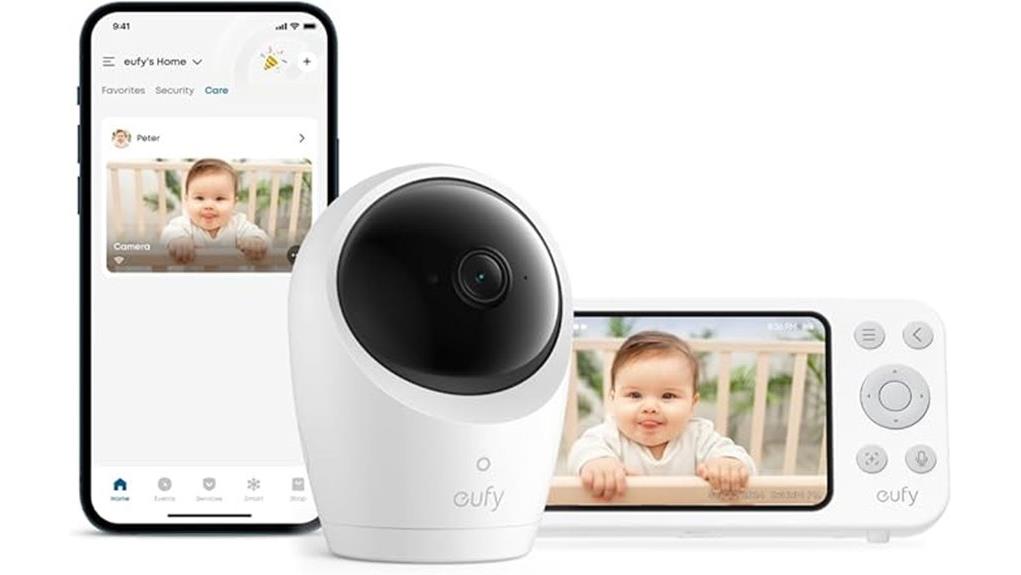
A baby monitor has to do more than show a sharp picture. You need dependable audio, practical alerts, safe placement, and privacy controls that fit the way your family uses the nursery. The Eufy Security Baby Monitor E20 combines a dedicated 5-inch parent display with optional eufy Baby app access, so you can monitor locally without Wi-Fi or connect remotely when needed. This review explains where the E20 performs well, what is included, and the tradeoffs you should understand before buying, including its 720p parent screen, indoor-only design, and one-camera package.
Quick Verdict
Rating: 8.8/10
Best For: Parents who want a 2K camera, a dedicated parent unit, optional app access, battery-powered placement, and a physical switch for local-only monitoring.
Bottom Line: The E20 is a flexible hybrid monitor with strong camera coverage, useful alerts, local storage support, and better privacy control than many Wi-Fi-only models. Its main tradeoffs are the 720p parent display, the need for a separate microSD card for local recording, and the extra camera required for split-screen use.
| Specification | Detail |
|---|---|
| Brand | eufy Security |
| Product | Eufy Security Baby Monitor E20 |
| Model number | T8352 |
| Product type | Hybrid video baby monitor with camera, parent unit, and optional app access |
| Camera resolution | 2K HD with night vision |
| Parent display | 5-inch, 720p display |
| Camera movement | 330° horizontal pan and 60° vertical tilt |
| Zoom | 4× digital zoom |
| Audio | Two-way audio with active noise reduction rated to reduce background noise by 20 dB |
| Connectivity | Direct local connection to the parent unit, optional Wi-Fi app access, and Smart Connect support |
| App sharing | Share app access with up to five family members |
| Direct range | Up to 800 ft under favorable conditions; walls, floors, and interference reduce range |
| Camera battery | 5,000mAh built-in rechargeable battery |
| Listed camera runtime | About 9 hours in standard use or about 5.5 hours with night vision |
| Alerts | Cry detection, loud-sound detection, and room temperature alerts |
| Local storage | Supports a compatible microSD card up to 128 GB; card is not included |
| Recording | 24/7 recording controls and playback through the eufy Baby app with compatible local storage |
| Privacy | Physical Wi-Fi switch, local-only mode, RSA-1024 and AES-128 encryption, and a unique recording key |
| Included in the box | Camera, parent monitor, 3 m camera cable, 1.5 m monitor cable, two 5V/2A adapters, mounting plate, screw pack, and quick-start guide |
| Safety note | Indoor use only. Keep the monitor, cords, mount, and accessories outside your baby’s reach. |
What Is the Eufy Security Baby Monitor E20?
The Eufy Security Baby Monitor E20, model T8352, is a hybrid monitoring system. The camera connects directly to the included parent unit for local viewing, and you can switch on Wi-Fi when you want remote access through the eufy Baby app. This setup is useful when you want a private bedside screen at night but still need phone access while another caregiver is home.
The camera captures 2K video and provides night vision, 330° pan, 60° tilt, 4× digital zoom, and two-way audio. The package includes one camera and one 5-inch parent display. Split-screen viewing is supported, but it requires a second compatible camera.
The battery-powered camera is the feature that separates the E20 from many fixed nursery cameras. You can move it between rooms or use it during a short outage without placing it next to an outlet. For longer overnight sessions, you will usually want the power cable nearby because night vision lowers the listed runtime to about 5.5 hours.
Who Should Buy It?
Best For
- Parents who want a dedicated local monitor without giving up optional phone access.
- Families who move the camera between a nursery, bedroom, hotel, or grandparent’s home.
- Buyers who value 2K capture, wide pan and tilt control, local storage, and a physical Wi-Fi switch.
Skip If
- You want a two-camera package ready for twins or two rooms on day one.
- You need an outdoor or weather-resistant camera.
- You want the parent unit itself to display the camera feed at full 2K resolution.
Before You Buy: The box includes one camera, and the microSD card is sold separately. Budget for a second compatible camera if you need split-screen viewing, and add a compatible card if you plan to use local 24/7 recording.
Video Quality and Camera Control
2K Camera and 720p Parent Display
The camera captures video at 2K resolution, which gives the app and saved recordings more image detail than a basic 720p camera. The included 5-inch parent unit has a 720p display, however, so it cannot show every pixel captured by the camera. The screen is still suitable for checking whether your baby is awake, confirming sleep position, and watching general movement, but the resolution difference is worth knowing before you buy.
Night vision supports low-light checks without turning on the nursery light. Treat the image as a visual aid rather than a breathing or medical monitor. A clear picture can help you decide when to enter the room, but it cannot confirm that a baby is medically well.
Pan, Tilt, and Digital Zoom
The 330° pan and 60° tilt range covers most of a nursery when the camera is placed on a stable shelf or mounted correctly. Remote movement is especially useful after a child begins changing positions in the crib or when one camera needs to cover a crib and nearby play area at different times.
The 4× zoom is digital, so image quality falls as you zoom farther in. Position the camera for a useful full-frame view first, then use zoom for short checks instead of relying on it to correct poor placement.
Connectivity and Privacy
In local mode, the camera communicates directly with the parent unit without sending the live view through your home Wi-Fi. The physical Wi-Fi switch makes that choice easy to understand. When you need remote viewing, switch Wi-Fi on and use the eufy Baby app.
App access can be shared with up to five family members, which is useful for a partner, grandparent, or trusted caregiver. Remove access when it is no longer needed, use a strong account password, and keep the camera and app firmware current.
For connected use, eufy lists RSA-1024 and AES-128 encryption for streams and recordings, with a unique key for each recording. Those protections reduce risk but do not make any connected camera risk-free. Local-only mode remains the simpler choice when remote access is unnecessary.
Battery Life and Portability
The camera contains a 5,000mAh rechargeable battery. Eufy lists about 9 hours of standard use or about 5.5 hours with night vision. Actual runtime depends on viewing time, movement controls, signal strength, alerts, recording, battery age, and temperature.
This battery is practical for naps in another room, family visits, hotel stays, or brief power interruptions. It is less suited to cordless use for a full night with night vision. Charge the camera before travel and bring the included 3 m power cable and adapter.
The parent unit has a listed direct range of up to 800 ft in favorable conditions. Walls, floors, appliances, and wireless interference can reduce that distance. Smart Connect can use your home router when the direct link becomes weak, but that feature depends on your home Wi-Fi.
Noise Reduction and Smart Alerts
Active noise reduction is rated to cut steady background sound by 20 dB. This can make fan, air-conditioner, and low household noise less distracting through the parent unit, although it will not remove every sound or prevent every false alert.
The E20 can detect crying and loud sounds and can notify you about room temperature changes. Cry and sound sensitivity can be adjusted across five levels, and notification intervals can be changed in the app. Start with a middle setting, then adjust it after you learn how the monitor reacts to white noise, doors, pets, and normal sleep sounds.
Alerts support caregiver awareness, but they do not replace direct checks or supervision. A temperature reading also reflects the sensor’s location, which may differ from the temperature at mattress level or across the room.
Recording and App Features
The E20 supports local microSD storage up to 128 GB and 24/7 recording controls through the eufy Baby app. A microSD card is not included. Use a compatible card, install it in the camera, and format it through the app before depending on recording.
App playback can help you review wakeups, noise events, or a missed alert. Recording does not guarantee that every event will be captured, so confirm that storage is recognized and test playback after setup. Check remaining storage and recording status from time to time rather than assuming the feature is running.
Two-way audio lets you speak through the camera from the parent unit or app. It may help you reassure an older baby or coordinate with another caregiver, but it should not delay an in-person check when your child needs attention.
Pro Tip: Complete setup in stages. Test the direct parent-unit connection first, then enable the app, add trusted users, format the microSD card, and confirm that a test recording plays back before the first overnight use.
Setup Tips Before First Use
Choose a stable location that gives you a clear crib view without placing the camera or cords near the sleep space. The U.S. Consumer Product Safety Commission advises keeping baby monitor cords and monitor parts at least 3 feet from any part of a crib, bassinet, or play yard. Never place the camera inside or on the edge of the crib. Review the CPSC baby monitor cord warning and follow the eufy mounting instructions.
After mounting or placing the camera, test pan, tilt, zoom, night vision, two-way audio, temperature alerts, and sound alerts. Walk to the rooms where you normally use the parent unit and check the direct signal before relying on the listed maximum range.
Turn on Wi-Fi only when you are ready to configure app access. Use a unique account password, review shared users, and install firmware updates offered through official eufy software. If you add a microSD card, confirm that the app recognizes and formats it correctly.
How It Performs in Real Use
For Overnight Monitoring
The dedicated parent display is the E20’s main nighttime advantage because you do not need to leave your phone screen active. Night vision, two-way audio, sound alerts, and temperature alerts cover the core overnight tasks. The camera battery may not last a full night with night vision, so plugged-in use is the more dependable setup when the cord can be routed safely.
For Travel and Family Visits
The battery-powered camera gives you more placement freedom in a hotel or guest room. Pack both power cables, both adapters, and the parent unit because unfamiliar Wi-Fi may be unreliable or inappropriate for a nursery camera. Local mode lets you monitor without joining a hotel or guest network.
For Twins or Two Rooms
Split-screen support allows two feeds on the parent display, but the standard package includes only one camera. A second compatible camera adds cost and requires pairing before use. Confirm add-on camera compatibility instead of assuming any eufy baby camera will work with model T8352.
For Larger Homes
The listed 800 ft direct range is a best-case figure, not a promise for every floor plan. Dense walls, metal, appliances, and multiple floors can weaken the link. Test the rooms that matter most, then use Smart Connect if your router provides a stronger path between the camera and parent unit.
Baby Safety Notes
The E20 is a monitoring aid, not a medical device and not a replacement for direct supervision. It does not diagnose illness, confirm safe breathing, or guarantee that an alert will occur. Check your baby directly whenever behavior, breathing, temperature, or silence concerns you.
Keep the camera, mounting hardware, and every cord at least 3 feet from the crib, bassinet, play yard, or other sleep space. Recheck placement as your child grows because a cord or device that was once out of reach may become accessible later.
The camera is designed for indoor use and is not weatherproof. Keep it away from rain, bathrooms with heavy moisture, unstable shelves, heaters, direct sunlight, and any location where it could fall into the crib.
Pros and Cons
Pros
- Hybrid design works through the included parent unit and through the app when Wi-Fi is enabled.
- 2K camera, 330° pan, 60° tilt, night vision, and 4× zoom provide flexible nursery coverage.
- Battery-powered camera is useful for naps, travel, room changes, and short outages.
- Physical Wi-Fi switch, local-only mode, and local microSD storage provide practical privacy choices.
- Cry, loud-sound, and temperature alerts add useful awareness without requiring constant screen watching.
Cons
- The 5-inch parent unit is 720p, so it does not display the 2K camera feed at full captured resolution.
- Split-screen monitoring requires a second compatible camera, and local recording requires a separate microSD card.
- Night vision reduces listed camera runtime to about 5.5 hours, and the camera is for indoor use only.
Is It Worth the Price?
The E20 belongs in the mid-range to premium part of the baby monitor market because it combines a dedicated screen, app access, a 2K camera, battery-powered placement, smart alerts, and local recording support. Its value is strongest when you will use both monitoring modes instead of treating the parent unit or app as an unused extra.
It is worth considering if you want local monitoring at night and remote access at other times. The physical Wi-Fi switch and local storage support also make it better for buyers who want more control over when the camera is connected.
It is less compelling when you only need audio, require two cameras immediately, or expect a full-2K parent display. Check current package contents, add-on camera compatibility, seller terms, and warranty coverage before ordering.
How It Compares to Alternatives
The eufy Baby Monitor E21 keeps the same hybrid concept but moves to a 4K camera, 8× zoom, and a charging base. It is the better eufy option when image detail matters more than price. The E20 is the more sensible choice when 2K capture and 4× zoom are enough.
The Babysense PRO is worth comparing when your priority is a non-Wi-Fi package that can include two cameras and a 5.5-inch split-screen display. Nanit is better suited to buyers who want app-centered sleep features and are comfortable depending more heavily on an internet-connected system. The E20 sits between those approaches by including a parent unit while keeping optional app access.
Frequently Asked Questions
Can the Eufy Security Baby Monitor E20 work without Wi-Fi?
Yes. The camera can connect directly to the included parent unit for local monitoring. The physical Wi-Fi switch lets you keep Wi-Fi off until you need app access or Smart Connect.
Can I view the E20 on my phone and share access?
Yes. Turn on Wi-Fi and add the monitor to the eufy Baby app for remote viewing. App access can be shared with up to five family members, but you should remove users who no longer need access.
Does the parent monitor show the video in 2K?
No. The camera captures 2K video, but the included 5-inch parent display is 720p. The screen is clear enough for routine checks, but it cannot show the full captured resolution.
How long does the E20 camera battery last?
Eufy lists about 9 hours in standard use or about 5.5 hours with night vision. Runtime varies with viewing, movement, recording, signal strength, battery condition, and temperature.
Does the E20 include a microSD card for recording?
No. The camera supports a compatible microSD card up to 128 GB, but the card is sold separately. Install and format the card through the app, then test recording and playback before relying on it.
Is the E20 good for twins or two rooms?
It can be, because the parent unit supports split-screen viewing with two feeds. The standard package includes one camera, so you need a second compatible camera and must pair it before use.
Can the E20 detect breathing or replace direct checks?
No. The E20 provides video, audio, cry, loud-sound, and temperature features, but it is not a medical device and does not confirm safe breathing. Check your baby directly whenever you have a health or safety concern.
Who should skip the Eufy Security Baby Monitor E20?
Skip it if you need a weatherproof camera, a two-camera kit in the box, a full-2K parent display, or a very simple audio-only monitor. It is best for indoor use by families who will benefit from both local and app-based monitoring.
The Bottom Line
The Eufy Security Baby Monitor E20 earns its 8.8/10 rating by combining a sharp 2K camera, a dedicated parent unit, optional app access, useful alerts, local storage, and a physical Wi-Fi switch. Buy it when you want flexible indoor monitoring and portable camera placement; skip it when you need two cameras in the box, weather resistance, or full-2K viewing on the parent display.
Ready to Buy?
Check the latest price, package contents, and product details before you decide.