Disclosure: As an Amazon Associate, we earn from qualifying purchases. If you click a link on this page and make a purchase, we may receive a small commission at no extra cost to you.
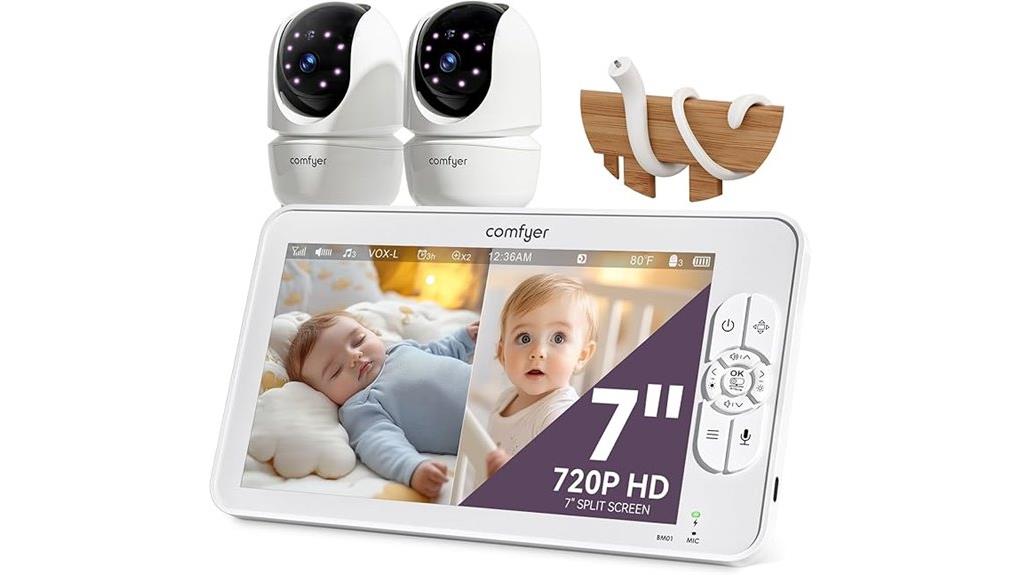
A baby monitor has to earn your trust every night. You need a clear view, reliable sound alerts, controls you can use in the dark, and enough battery life to avoid constant charging. The Comfyer BM01 Baby Monitor pairs a 7-inch parent display with two 1080p cameras through a direct 2.4GHz FHSS connection, so it works without WiFi or a phone app. This review explains where its split-screen design, 6000mAh battery, remote camera controls, and flexible mount help, and where the lack of remote smartphone viewing may be a dealbreaker.
Quick Verdict
Rating: 8.4/10
Best For: Parents who want a large, private, non-WiFi monitor for two children or two rooms.
Bottom Line: The Comfyer BM01 combines a 7-inch split-screen display, two remote-control cameras, up to 13 hours of continuous video, and up to 48 hours in audio-only VOX use. Its main limitation is simple: you cannot view the feed through a smartphone or check the nursery while you are away from home.
At a Glance
| Specification | Detail |
|---|---|
| Brand | Comfyer |
| Model | BM01 |
| Product type | Dedicated video baby monitor |
| Listing configuration | One parent display, two cameras, and a flexible camera mount |
| Parent display | 7-inch 720p color screen |
| Camera resolution | Two 1080p cameras |
| Connectivity | Direct 2.4GHz FHSS connection with digital encryption, no WiFi or app support |
| Battery | 6000mAh rechargeable parent-unit battery |
| Claimed runtime | Up to 13 hours of continuous video or up to 48 hours in audio-only VOX use |
| Camera movement | Remote 355° horizontal pan and 120° vertical tilt |
| Zoom | 2x and 4x digital zoom |
| Multi-camera support | 2-camera and 4-camera split-screen options, supports up to four paired cameras |
| Audio | Two-way talk, sound alerts, and scan mode |
| Night use | Automatic infrared night vision |
| Soothing sounds | Five lullabies and three ambient sounds |
| Temperature feature | Room-temperature display with adjustable high and low alerts |
| Claimed range | Up to 960 feet in open conditions |
| Warranty | 12-month limited warranty, extendable to 24 months after product registration |
| Safety note | Use only as a monitoring aid. Keep every cord and device at least 6 feet from the crib and out of a child’s reach. |
What Is the Comfyer BM01 Baby Monitor?
The Comfyer BM01 is a dedicated, indoor video monitor built around a separate parent display. The version linked in this review includes a 7-inch 720p screen, two 1080p cameras, and a flexible gooseneck mount. The cameras connect directly to the parent unit through 2.4GHz FHSS rather than your home router.
That design suits families who want a monitor that works without a cloud account, phone notifications, or WiFi setup. You still get the main features expected from a modern video monitor, including remote pan and tilt, digital zoom, night vision, two-way talk, VOX sound activation, temperature alerts, soothing sounds, and split-screen viewing.
Key Takeaways
- The 7-inch 720p parent screen can show two camera feeds at once, and the system can pair with up to four cameras.
- The included cameras capture at 1080p, while remote 355° pan, 120° tilt, and 2x or 4x zoom help you adjust the view from the parent unit.
- The 6000mAh battery is rated for up to 13 hours of continuous video or up to 48 hours in audio-only VOX use.
- The direct 2.4GHz FHSS connection works without WiFi, but it also means there is no smartphone app or viewing from outside the home.
- The flexible mount adds placement options, but every cord, camera, and mount must remain well outside your child’s reach.
Before You Buy: Confirm the Amazon variant before ordering. This review covers the dual-camera BM01 listing with a flexible mount. Comfyer also sells other camera counts, and included accessories can differ by kit.
Who Should Buy It?
Best For
- Parents who want a large dedicated display without connecting a nursery camera to WiFi.
- Families monitoring twins, siblings, or two rooms with two included cameras.
- Caregivers who value long VOX runtime, remote camera movement, and simple push-button controls.
Skip If
- You need smartphone access, cloud clips, motion tracking, or alerts while away from home.
- You want medical-style breathing, oxygen, or sleep tracking.
- You only need a compact audio monitor and do not want a 7-inch screen or two-camera setup.
Display, Cameras, and Remote Controls
The 7-inch parent unit is the BM01’s main usability advantage. Its 720p screen is larger than many compact dedicated monitors, so split-screen feeds are easier to read from a nightstand or across a room. The two included 1080p cameras provide the source video, though the parent display itself shows that feed at its own 720p resolution.
From the parent unit, you can pan each camera up to 355° horizontally and tilt it up to 120° vertically. The 2x and 4x digital zoom can help you check a face, sleep position, or a wider part of the room, but digital zoom does not add new image detail. A careful camera position still matters more than zoom.
Split-Screen and Multi-Camera Monitoring
The BM01 is designed for more than one viewing area. With two cameras paired, you can use split screen to watch both feeds together. The system also supports up to four cameras, with 2-camera or 4-camera split-screen options.
Audio does not play from every camera at the same time. In split-screen use, you select one camera for continuous listening, or use scan mode to switch audio between cameras at set intervals. This setup is practical for siblings, but you should learn the audio controls before relying on it overnight.
Audio, Night Vision, and Soothing Sounds
Two-way talk lets you speak through the parent unit and camera speaker. It can help you reassure a child before entering the room, but it should not replace an in-person check when your baby sounds distressed or the picture is unclear.
Automatic infrared night vision changes the camera to a low-light view after the room darkens. It avoids the need to turn on a nursery light, though the result still depends on placement, distance, glare, and objects near the lens. The monitor also includes five lullabies and three ambient sounds, plus a room-temperature display with adjustable high and low alerts.
| Feature | What It Does | Buyer Benefit or Limit |
|---|---|---|
| Two-Way Talk | Sends your voice through the selected camera | Useful for brief reassurance, not a substitute for direct supervision |
| Remote Pan and Tilt | Moves the camera 355° left to right and 120° up and down | Lets you correct the view without entering the room |
| 2x and 4x Zoom | Digitally enlarges part of the picture | Helpful for quick checks, but image detail decreases as you zoom |
| Night Vision | Uses infrared LEDs in a dark room | Supports overnight checks without a bright nursery light |
| Split Screen | Displays two or four paired camera feeds | Useful for multiple children, but audio comes from one selected feed or scan mode |
Connectivity, Privacy, and Range
The BM01 uses a direct 2.4GHz FHSS connection with digital encryption. You do not need a WiFi password, phone app, cloud account, or internet service for normal viewing. That reduces setup steps and keeps the live feed within a dedicated camera-to-monitor system.
The claimed open-area range is up to 960 feet. That number is measured under favorable conditions, not through several walls and floors. Concrete, metal, large appliances, routers, microwaves, and the layout of your home can shorten the usable distance or create weak-signal spots.
Battery Life and VOX Mode
The rechargeable parent unit has a 6000mAh battery. Comfyer rates it for up to 13 hours of continuous video or up to 48 hours in audio-only VOX use. Those figures are maximum claims, and actual runtime will vary with screen brightness, volume, signal strength, temperature, and how often VOX wakes the display.
VOX mode turns off the screen while the system continues listening for sound. When noise rises above the selected sensitivity level, the screen wakes and the unit alerts you. Low, medium, and high VOX settings let you balance sensitivity against battery life, but you should test the setting with your own room noise before overnight use.
Setup Tips Before First Use
Fully charge the parent unit, power each camera, and confirm that both camera feeds appear before placing the system in the nursery. Test pan, tilt, zoom, two-way talk, night vision, temperature alerts, VOX sensitivity, and low-battery alerts while you can still adjust the setup easily.
Place each camera for a clear view without aiming through crib slats, hanging fabric, or reflective surfaces. Keep the monitor away from water and heat, and leave space around the units so vents and speakers are not blocked. The manual also recommends keeping the system at least 5 feet from electronics such as microwave ovens or WiFi routers when interference occurs.
Pro Tip: Test the setup twice, once in daylight and once after the room is fully dark. A camera angle that looks clear during the day can produce glare, blocked details, or a weak night-vision view after lights-out.
Baby Safety and Care Notes
A video monitor is an observation aid, not a replacement for responsible adult supervision or safe sleep practices. Keep the camera, parent unit, adapters, flexible mount, and all cords out of your child’s reach. Comfyer’s manual says cords and units should be at least 6 feet from the crib, bassinet, play yard, or any area a child can reach.
Do not place either unit on a bed, sofa, blanket, or another surface that can block ventilation. Keep the system away from water, direct heat, and strong sunlight. For cleaning, unplug and switch off the units, then wipe them with a soft, lint-free cloth. Do not use solvents or allow liquid to enter an opening.
Treat the temperature reading as a room reference, not as a medical measurement or the only guide to your baby’s comfort. Check your child directly when something seems wrong, and follow current safe-sleep advice from your pediatrician or a recognized child-safety authority.
How It Performs in Real Use
For Overnight Monitoring
The large screen, automatic night vision, VOX wake-up, and low-battery alert fit overnight use well. The 48-hour figure applies to audio-only VOX use, so continuous video will need more frequent charging. Set the VOX sensitivity high enough to catch meaningful sounds without waking the display for every background noise.
For Naps Around the House
The portable parent unit lets you move between rooms without carrying your phone. Remote pan and tilt are useful when a child shifts position or when one camera covers both a crib and a nearby play area. Range will depend on your walls and floor plan, so test the monitor in the kitchen, yard, basement, and other places you actually use.
For Twins or Siblings
The two included cameras and 7-inch split screen are the strongest reasons to choose this kit. You can watch both rooms together, lock audio to the child who needs closer listening, or use scan mode. Because sound is not simultaneous from every feed, confirm your preferred audio mode before bedtime.
For Travel or a Grandparent’s House
The no-WiFi design avoids asking for a router password or installing an app on another phone. You still need safe cord placement, power outlets for the cameras, and enough room for the 7-inch parent unit. Pack the cameras, adapters, mount, and manual together so no required part is left behind.
Pros and Cons
Pros
- Large 7-inch 720p display is easier to view in split-screen mode than a compact handset.
- Dual 1080p cameras and an included flexible mount suit two rooms or two children.
- Remote 355° pan, 120° tilt, and 2x or 4x zoom provide useful framing control.
- 6000mAh parent-unit battery supports long audio-only VOX use and up to 13 hours of continuous video.
- No-WiFi FHSS connection avoids app accounts and dependence on your home internet.
Cons
- No smartphone viewing, cloud recording, or access when you are away from home.
- Only one camera’s audio is active at a time in split-screen use unless you use scan mode.
- The 960-foot range is an open-area claim, and walls or electronics can reduce real-world performance.
Is It Worth the Price?
The Comfyer BM01 offers its best value to a family that would otherwise need two nursery cameras and a large dedicated display. The dual-camera kit, split-screen viewing, remote controls, long VOX runtime, and flexible mount create a complete in-home setup without requiring a subscription or cloud service.
It is less compelling when you only need one basic camera or when app access is your top priority. In those cases, a smaller single-camera monitor or a WiFi model may cost less or fit your routine better. Check the exact camera count and included accessories on the listing before comparing prices.
How It Compares to Alternatives
The same-brand Comfyer BM02 is the more relevant comparison when you want app control and remote phone viewing. The BM01 is simpler and more private for in-home use because it does not rely on WiFi, while the BM02 is better suited to checking the feed away from the dedicated screen.
Non-WiFi split-screen models from HelloBaby and Babysense are also worth comparing for screen size, camera count, battery runtime, and included mounts. The BM01 makes the most sense when a 7-inch display, two included cameras, and long VOX battery life matter more than app features.
Frequently Asked Questions
Does the Comfyer BM01 work without WiFi?
Yes. The cameras connect directly to the parent unit through 2.4GHz FHSS, so normal monitoring does not require WiFi, an internet connection, or a phone app. The tradeoff is that you cannot view the feed remotely through a smartphone.
How many cameras come with this BM01 listing?
The Amazon link in this review is for a kit with two 1080p cameras and a flexible mount. Comfyer sells other configurations, so verify the camera count and package contents shown at checkout.
Can the BM01 show both cameras at the same time?
Yes. Its split-screen mode can display two paired feeds together, and the system supports up to four cameras with a 4-camera view. Audio comes from one selected camera at a time, or you can use scan mode to rotate between feeds.
How long does the parent-unit battery last?
Comfyer claims up to 13 hours of continuous video or up to 48 hours in audio-only VOX use from the 6000mAh battery. Brightness, volume, signal strength, temperature, and frequent screen wake-ups can reduce real-world runtime.
What is the usable range?
The listing states up to 960 feet in open conditions. Inside a home, walls, floors, appliances, metal, and nearby electronics can shorten that distance, so test every room and outdoor area where you plan to carry the display.
Where should you place the camera and flexible mount?
Choose a stable location with a clear view, then secure the camera, mount, and every cord at least 6 feet from the crib and outside your child’s reach. Do not place a camera, adapter, or parent unit inside the crib or on a surface that blocks ventilation.
What warranty does the Comfyer BM01 include?
The BM01 manual states a 12-month limited warranty. It also says registration through Comfyer can extend coverage to 24 months, so keep your proof of purchase and review the current registration terms.
Who should skip the Comfyer BM01?
Skip it if you need smartphone access, cloud video, motion tracking, medical-style monitoring, or viewing while away from home. It is designed for direct, in-home camera-to-parent-unit monitoring.
The Bottom Line
The Comfyer BM01 Baby Monitor is recommended for parents who want a large non-WiFi display, two cameras, split-screen viewing, remote pan and tilt, and long VOX battery life. Its strongest advantage is the complete dual-room setup, while its main limitation is the lack of smartphone and out-of-home access. Choose a WiFi model instead when remote app viewing matters more than a dedicated closed-system monitor.
Ready to Buy?
Check the latest price, camera count, and included accessories before you decide.