YOTON Indoor Security Camera Review

Avatar photo
by Luis
Updated On:
yoton camera performance insights
---Advertisement---

Disclosure: As an Amazon Associate, we earn from qualifying purchases. If you click a link on this page and make a purchase, we may receive a small commission at no extra cost to you.

By Editorial Team · Reviewed for accuracy · Last updated June 2026

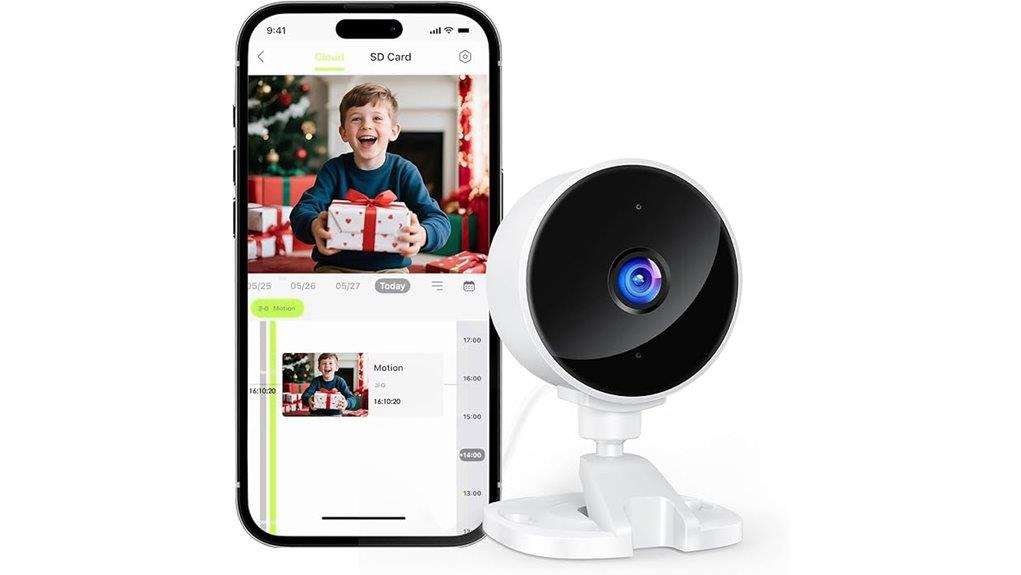
Indoor security cameras can help you check on your home, pets, kids, entryways, or office space, but the right choice depends on video clarity, app control, alerts, and storage options. The YOTON Indoor Security Camera is built around 1080p HD video, night vision up to 33 feet, two-way audio, and AI motion detection through the Osaio app. It is a practical pick if you want a compact indoor camera with remote viewing and flexible local or cloud storage. The main tradeoff is that it depends on a 2.4GHz Wi-Fi connection for normal smart features, so it is not ideal if your home network is unreliable.

Quick Verdict

Rating: Recommended with caveats

Best For: Homeowners, renters, pet owners, parents, and small-office users who want simple indoor monitoring.

Bottom Line: The YOTON Indoor Security Camera gives you useful indoor monitoring features, including 1080p video, night vision, two-way audio, and AI alerts. It is strongest as a Wi-Fi-connected indoor camera, but you should skip it if you need outdoor protection or reliable use without Wi-Fi.

Check Price on Amazon →

Key Takeaways

  • The YOTON Indoor Security Camera records in 1080p HD, giving you clear indoor video for daily monitoring.
  • Night vision up to 33 feet helps you keep an eye on rooms, hallways, or entry areas in low light.
  • AI recognition can help separate people, pets, packages, and vehicles, which may reduce unnecessary alerts.
  • Two-way audio lets you speak through the camera using the Osaio app.
  • The camera supports local storage with a TF card and also offers cloud storage options.
  • It is designed for indoor use and needs a 2.4GHz Wi-Fi network for normal app control and remote viewing.

YOTON Indoor Security Camera Specs

Specification Detail
Brand YOTON
Product Type Indoor security camera
Video Quality 1080p HD
Night Vision Up to 33 feet
Audio Two-way audio
Detection Motion and sound detection with AI recognition
AI Recognition People, pets, packages, and vehicles
App Osaio app
Wi-Fi Requirement 2.4GHz Wi-Fi network
Storage Local TF card storage and cloud storage options
Cloud Trial 14 days
Dimensions 2.6 x 2.8 x 3.5 inches
Best Use Indoor rooms, nurseries, living rooms, kitchens, offices, and entry areas
Warranty 24-month warranty
Support 24/7 customer support

What Is the YOTON Indoor Security Camera?

The YOTON Indoor Security Camera is a compact Wi-Fi camera made for indoor monitoring. It gives you 1080p HD video, night vision, two-way audio, motion alerts, sound alerts, and app-based control through the Osaio app.

It is designed for places where you want quick visibility without installing a larger security system. You can use it in a living room, nursery, kitchen, office, hallway, or near an indoor entry point. Its small size, 2.6 x 2.8 x 3.5 inches, makes it easier to place on a shelf, table, desk, or other stable indoor surface.

The camera also supports both local TF card storage and cloud storage options. That gives you more control over how you save clips, although cloud storage may require a subscription after the trial period.

Who Should Buy It?

Best For

  • People who want a compact indoor camera for daily home monitoring.
  • Parents who want to check on a nursery or child’s room from the app.
  • Pet owners who want motion alerts and two-way audio while away from home.
  • Small-office users who want to monitor indoor entry points or sensitive areas.

Skip If

  • You need an outdoor weather-resistant camera.
  • Your Wi-Fi network is mostly 5GHz or unreliable in the room where you plan to place it.
  • You need adjustable video-quality settings instead of fixed 1080p HD.

Before You Buy: This camera is best treated as an indoor Wi-Fi camera. For normal remote viewing, app alerts, and smart controls, plan on using a stable 2.4GHz Wi-Fi connection.

Key Features of the YOTON Indoor Security Camera

The YOTON Indoor Security Camera focuses on the main features most indoor buyers look for: clear video, night visibility, app alerts, two-way audio, and flexible storage. Its 1080p HD video quality gives you enough clarity for everyday indoor monitoring, while night vision up to 33 feet helps you see activity when the lights are low.

The camera also includes AI motion detection, which can help identify people, pets, packages, and vehicles. This matters because basic motion alerts can be too broad. With smarter detection, you may get fewer unnecessary alerts from normal movement.

For communication, the two-way audio feature lets you speak through the camera using the Osaio app. That can be useful if you want to talk to a family member, calm a pet, or respond to someone in the room.

Video Quality and Night Vision

The camera records in 1080p HD, which is a practical resolution for indoor security use. It is suitable for checking activity in a room, watching a pet, viewing a doorway, or confirming whether someone entered a space.

The night vision range of up to 33 feet gives the camera more value after dark. This is helpful in hallways, nurseries, living rooms, and office spaces where lighting changes during the day and night.

One limitation is that the article-supported video setting is fixed at 1080p HD. If you want manual control over video resolution, this may not be the best match.

Motion, Sound, and AI Detection

Motion and sound detection make the camera more useful than a basic live-view device. When the camera detects activity, you can receive alerts through the app, helping you respond faster to movement or sound in the monitored area.

The AI recognition feature is designed to distinguish between people, pets, packages, and vehicles. For an indoor camera, the most useful categories will usually be people and pets, especially in living rooms, nurseries, offices, and hallways.

Sound sensitivity can be adjusted with High, Medium, and Low settings. This is useful because every room is different. A quiet nursery may need a different sensitivity level than a busy living room or office.

Two-Way Audio and App Control

The two-way audio feature allows real-time communication through the Osaio app. You can use it to speak to someone at home, check in with children, or talk to pets while you are away.

The Osaio app also gives you control over monitoring and notifications. After setup, you can use the app for live viewing, alerts, and camera interaction from your smartphone.

For the best experience, place the camera where the microphone and speaker are not blocked. Avoid hiding it behind thick objects, inside cabinets, or behind fabric, as that can reduce audio clarity and camera visibility.

Storage Options: TF Card and Cloud

The YOTON Indoor Security Camera supports local storage through a TF card and also offers cloud storage options. Local storage can appeal to users who prefer saving footage on a physical card, while cloud storage may be more convenient if you want access from outside the home.

The cloud storage trial lasts 14 days. After that, you should review the subscription terms before deciding whether cloud storage is worth keeping.

Storage needs depend on how often the camera records and how many alerts you receive. For busy rooms, you may want to check storage settings more often so important clips are not missed or overwritten.

How to Set Up Your YOTON Indoor Security Camera

Setting up the YOTON Indoor Security Camera is simple enough for most users. First, plug in the camera and download the Osaio app on your smartphone. Then connect the camera to a 2.4GHz Wi-Fi network.

After the camera connects, use the app to adjust notifications, view the live feed, and manage detection settings. You can also choose between local TF card storage and cloud storage options based on your needs.

Placement matters during setup. Put the camera in a central position with a clear view of the area you want to monitor. A shelf, cabinet top, desk, or corner table can work well as long as the camera is stable and the view is not blocked.

Pro Tip: Before finalizing placement, open the live view in the Osaio app and walk through the room. This helps you check the camera angle, blind spots, Wi-Fi strength, and alert behavior before you rely on it.

Ideal Locations for the YOTON Camera: Homes, Offices, and More

The YOTON camera works best in indoor spaces where you need a clear view of daily activity. In homes, useful placements include living rooms, nurseries, kitchens, hallways, and rooms where pets spend time.

In a nursery, the 1080p video, night vision, and two-way audio can help you check the room from your phone. In a living room or kitchen, the camera can help you monitor family activity, pets, or unexpected movement.

For office use, it can watch entry points, storage areas, desks, or sensitive indoor spaces. Because the camera measures only 2.6 x 2.8 x 3.5 inches, it can fit into smaller spaces without standing out too much.

Placement Tips for Better Results

  • Place it higher than eye level when possible: This can give you a wider view of the room.
  • Avoid pointing it directly at bright windows: Strong backlight can make indoor subjects harder to see.
  • Keep it close enough to Wi-Fi: Weak signal can affect remote viewing and alerts.
  • Do not block the speaker or microphone: Clear audio needs open space around the camera.
  • Test night vision after dark: A placement that looks good in daylight may need adjustment at night.

How It Performs in Real Use

For Daily Home Monitoring

For everyday indoor use, the YOTON camera gives you a clear view of rooms, hallways, or entry areas. The 1080p HD video is useful for checking whether someone entered a room, whether pets are active, or whether a space looks normal while you are away.

For Nursery or Child Room Use

The compact size, two-way audio, and night vision make it useful for checking a nursery or child’s room. It should still be used as a monitoring aid, not as a replacement for safe sleep practices, adult supervision, or a dedicated medical device.

For Pet Monitoring

Pet owners can use the camera to check movement during the day and speak through the two-way audio feature. AI recognition may also help separate pet movement from other activity, which can make alerts easier to understand.

For Small Offices

In an office, the camera can help monitor entry points, storage shelves, or sensitive indoor areas. The small body makes it easy to place on a desk or shelf, but you should follow workplace privacy rules and inform people when monitoring is required.

Safety, Privacy, and Use Notes

Because this is a security camera, placement should protect privacy as well as property. Do not place it in bathrooms, changing areas, guest sleeping spaces without notice, or any location where recording would violate privacy expectations or local rules.

For baby or child monitoring, use the camera only as an extra tool. It should not replace direct supervision, safe room setup, or professional guidance when safety concerns exist.

If you use cloud storage, review the app settings and storage terms. Choose strong account passwords and keep app access limited to trusted users.

How Motion and Sound Detection Work

Motion and sound detection capabilities make the YOTON Indoor Security Camera more useful for active monitoring. Instead of checking the live feed all day, you can rely on alerts when activity is detected.

  1. Motion Alerts: You receive notifications when the camera detects movement in the monitored area.
  2. AI Recognition: The camera can distinguish between people, pets, packages, and vehicles, helping reduce unnecessary alerts.
  3. Sound Sensitivity: High, Medium, and Low settings let you adjust detection based on the room and your alert preferences.

These features work best when the camera is placed correctly and the Wi-Fi connection is stable. A poor angle, blocked lens, or weak signal can reduce the usefulness of alerts.

Pros and Cons

Pros

  • 1080p HD video gives clear indoor monitoring for rooms, hallways, and offices.
  • Night vision up to 33 feet helps in dark or low-light spaces.
  • Two-way audio allows real-time communication through the app.
  • AI motion detection helps identify people, pets, packages, and vehicles.
  • Supports both TF card storage and cloud storage options.

Cons

  • Requires 2.4GHz Wi-Fi for normal smart features and remote viewing.
  • Not designed as an outdoor weather-resistant camera.
  • Video quality is fixed at 1080p HD, with no direct adjustment noted in the article.

What You Need to Know About Support and Warranty

Support and warranty coverage can matter with any connected home device. The YOTON Indoor Security Camera is backed by a 24-month warranty, and the article states that 24/7 customer support is available.

This is useful if you need help with setup, app pairing, storage questions, or warranty support. As with any warranty, keep your order details and follow the seller’s support process if you need service.

Support Feature Details
Warranty Duration 24 months
Support Availability 24/7
Customer Feedback Generally positive
Replacement Policy Available under warranty
Contact Method Email and phone support

Is It Worth the Price?

The YOTON Indoor Security Camera looks like a strong value for buyers who want practical indoor monitoring without moving into a complex multi-camera system. Its biggest value comes from the mix of 1080p video, night vision, two-way audio, AI alerts, and storage flexibility.

It is worth considering if you need an indoor camera for a nursery, living room, pet area, hallway, or small office. You get the most value if you plan to use the app alerts and remote viewing features regularly.

It is not the best fit if you need outdoor use, 5GHz-only Wi-Fi compatibility, or full control over video-quality settings. Those buyers should compare other cameras before deciding.

How It Compares to Alternatives

Compared with a basic indoor camera, the YOTON model gives you more useful monitoring features because it combines 1080p video, night vision, AI detection, two-way audio, and app alerts. That makes it more practical than a camera that only offers live viewing.

Compared with higher-end indoor camera systems, the main tradeoff is flexibility. Some premium cameras may offer broader smart-home integration, more advanced storage plans, or extra video settings. The YOTON camera makes the most sense if you want a compact indoor camera with the core features most homes and small offices need.

Frequently Asked Questions

Can I access the YOTON camera remotely while traveling?

Yes. Remote viewing is possible through the Osaio app when the camera is connected to Wi-Fi. This lets you check your home, pets, nursery, or office while you are away.

Does the camera work without Wi-Fi?

The camera needs Wi-Fi for normal app control, alerts, and remote viewing. Local recording may be available with TF card storage, but you should not expect full smart-camera features without a stable 2.4GHz Wi-Fi connection.

Is it compatible with other smart-home devices?

The camera supports app-based control through the Osaio app. If you need a camera for a specific smart-home system, check the current product details before buying to confirm compatibility.

How long does the cloud storage trial last?

The cloud storage trial lasts 14 days. This gives you time to test cloud recording before deciding whether you want to continue with a paid storage option.

Can I adjust the video quality settings?

The article-supported video quality is fixed at 1080p HD. If you need lower-resolution recording, manual bandwidth control, or multiple video-quality options, confirm those details before purchase.

Where should I place the camera for the best view?

Place it on a stable surface with a clear view of the room, hallway, or entry point you want to monitor. Avoid bright window glare, blocked corners, and locations with weak Wi-Fi signal.

Can I use it as a baby monitor?

You can use it to check a nursery or child’s room through the app. However, it should be treated as a monitoring aid, not a replacement for safe sleep practices, direct supervision, or medical-grade monitoring.

Who should skip the YOTON Indoor Security Camera?

Skip it if you need outdoor weather protection, advanced video-setting control, or a camera that works fully without Wi-Fi. It is better suited for indoor rooms with reliable 2.4GHz Wi-Fi.

The Bottom Line

The YOTON Indoor Security Camera is a good choice if you want a compact indoor camera with 1080p HD video, night vision up to 33 feet, two-way audio, motion and sound alerts, and flexible storage options. It is best for home, nursery, pet, and small-office monitoring where reliable 2.4GHz Wi-Fi is available.

You should skip it if you need outdoor use, full smart-home compatibility confirmation, or more control over video quality settings. For everyday indoor monitoring, it offers a practical balance of clarity, alerts, and ease of use.

Ready to Buy?

Check the latest price and product details before you decide.

Check Price on Amazon →

Leave a Comment