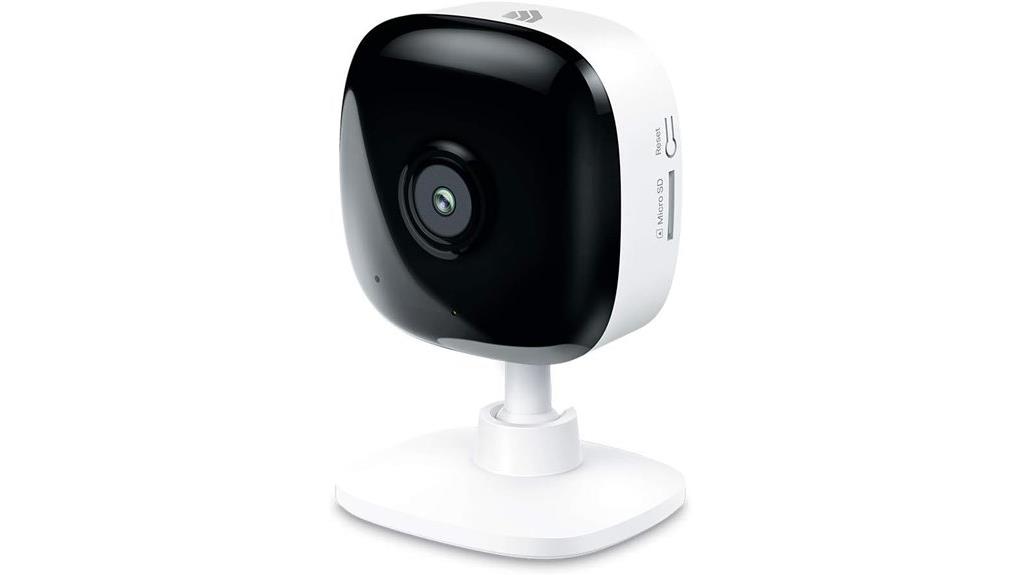
The Kasa 1080p Indoor Wired Security Camera presents a solid option for home monitoring. With HD video quality, it captures clear images at a resolution of 1920×1080 pixels and features a 113-degree viewing angle for broad coverage. Its night vision extends up to 30 feet, making it effective in low-light settings. Real-time motion and sound alerts keep users informed, while the mobile app allows for easy customization. Understanding its features is essential; let’s explore how to maximize its potential.
Key Takeaways
- The Kasa 1080p Indoor Wired Security Camera delivers clear visuals with 1080p HD video quality and a 113-degree viewing angle for broad coverage.
- It features night vision capabilities that extend up to 30 feet, ensuring visibility in low-light conditions.
- Real-time alerts for motion and sound, along with customizable activity zones, enhance security monitoring precision and responsiveness.
- Users can store footage locally via MicroSD cards up to 64 GB, avoiding additional fees for privacy.
- The camera integrates seamlessly with smart home systems and supports voice control through Amazon Alexa and Google Assistant.
Top Features That Make Kasa 1080p Security Camera Stand Out
The Kasa 1080p Indoor Wired Security Camera, known as the EC60, distinguishes itself through a combination of advanced features and practical functionality.
The Kasa EC60 camera blends advanced features with practical functionality for enhanced indoor security.
With 1080p HD video quality and a 113-degree viewing angle, it enhances the user experience by delivering clear visuals. Night vision capabilities extend up to 30 feet, ensuring camera reliability even in low-light conditions.
Real-time motion and sound alerts, alongside customizable activity zones, offer targeted monitoring. Additionally, integration with Amazon Alexa and Google Assistant adds convenience.
Its compact dimensions (2.32 x 1.95 x 3.5 inches) make it a versatile choice for various indoor settings.
How to Set Up and Customize Your Security Camera
Setting up and customizing the Kasa 1080p Indoor Wired Security Camera (EC60) is a straightforward process that guarantees peak performance for monitoring needs.
Begin with ideal camera placement, ensuring it captures the desired area. Using the mobile app, users can connect the camera to Wi-Fi, stream live footage, and configure settings effortlessly.
Customization options include defining activity zones, with up to four designated for focused monitoring. The app also facilitates adjustments to video quality and notification preferences, enhancing the user experience.
With its user-friendly interface, the Kasa camera empowers individuals to secure their spaces effectively and efficiently.
Understanding Real-Time Alerts?
Real-time alerts play a pivotal role in the functionality of the Kasa 1080p Indoor Wired Security Camera (EC60), ensuring users remain informed about activities within their monitored spaces.
With adjustable alert sensitivity, users can customize how responsive the camera is to movement and sound. Additionally, notification preferences can be tailored to individual needs.
Adjustable alert sensitivity allows users to fine-tune the camera’s response to movement and sound, ensuring personalized notification preferences.
- Instant alerts for detected motion or sound
- Customizable activity zones for focused monitoring
- Night vision capabilities extending up to 30 feet
These features empower users to maintain control, fostering a sense of security and awareness in any environment, whether for home or pet monitoring.
Should You Choose Local or Cloud Storage?
When considering storage options for the Kasa 1080p Indoor Wired Security Camera, one might wonder which method best suits their needs: local or cloud storage.
Local storage benefits include the ability to use MicroSD cards up to 64 GB for continuous recording without additional fees, ensuring privacy and control over footage.
Conversely, cloud storage drawbacks may include recurring costs and potential data accessibility issues, particularly during internet outages.
Weighing these factors allows users to determine the ideal balance between convenience and autonomy, empowering them to choose a solution that fits their specific monitoring requirements and lifestyle preferences.
How to Integrate Kasa Camera With Smart Home Systems
Integrating the Kasa 1080p Indoor Wired Security Camera with smart home systems can greatly enhance home monitoring capabilities, making daily life more convenient and secure.
This camera boasts impressive device compatibility, allowing seamless connection to various smart home automation systems.
- Voice Control: Utilize Amazon Alexa or Google Assistant for effortless operation.
- Automated Actions: Trigger lighting or other Kasa devices upon motion detection.
- Custom Alerts: Set personalized notifications for specific activity zones.
Frequently Asked Questions
What Is the Warranty Period for the Kasa EC60 Camera?
The warranty period for the Kasa EC60 camera is typically one year. This duration guarantees users can confidently explore its features and follow the installation guide, fostering a liberated experience in home monitoring.
Can the Camera Be Used Outdoors?
The camera is designed for indoor use and lacks weather resistance, making it unsuitable for outdoor settings. Users seeking liberation in security solutions should consider dedicated outdoor cameras for effective monitoring in varying environmental conditions.
Is There a Mobile App for Camera Management?
Yes, a mobile app facilitates camera management, offering access to camera features and enabling mobile notifications. This empowers users to monitor their environment remotely, enhancing security and providing peace of mind with convenient control.
How Do I Reset the Camera to Factory Settings?
To liberate the camera from its confines, one must follow these factory reset steps: press and hold the reset button for ten seconds. For additional clarity, consult camera troubleshooting tips to guarantee successful restoration.
What Type of Wi-Fi Network Is Required for Optimal Performance?
Enhanced performance requires a stable Wi-Fi network with a minimum bandwidth of 2.4 GHz, ensuring adequate coverage. Strong network security measures, such as WPA2 encryption, enhance safety and reliability, fostering a liberated smart home environment.
Conclusion
In conclusion, the Kasa 1080p Indoor Wired Security Camera offers a blend of high-definition clarity and smart features, making it an excellent choice for enhanced home security. Its 113-degree viewing angle, night vision up to 30 feet, and real-time alerts guarantee thorough monitoring. Notably, as more homeowners opt for smart technology, the Kasa camera seamlessly integrates with systems like Alexa and Google Assistant, reflecting a growing trend towards cohesive home security solutions.