Disclosure: As an Amazon Associate, we earn from qualifying purchases. If you click a link on this page and make a purchase, we may receive a small commission at no extra cost to you.
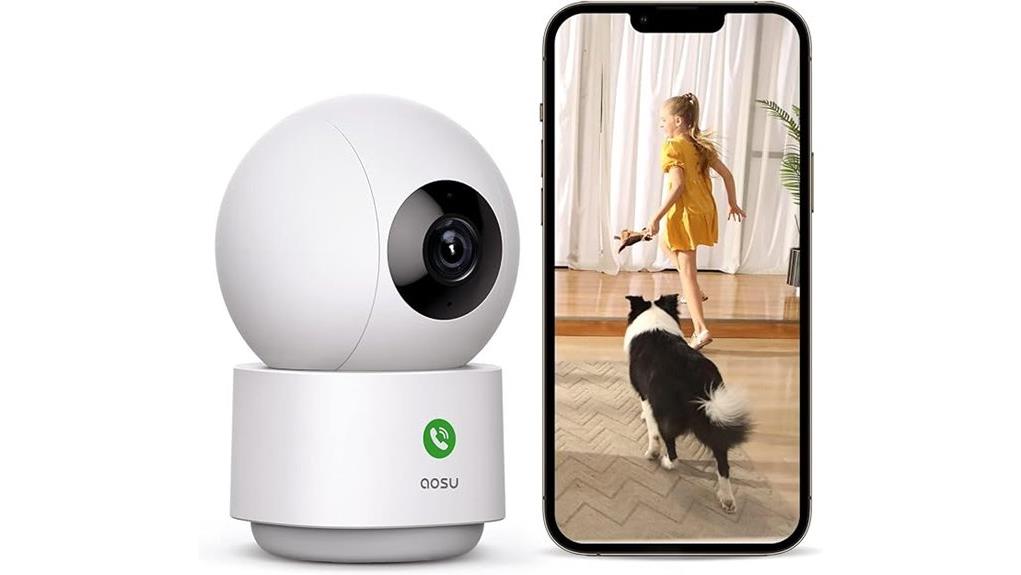
Choosing an indoor security camera is not only about sharp video. You also need wide room coverage, useful alerts, clear audio, simple setup, and storage options that fit your budget. The Aosu C2E2DA11 Security Camera aims to cover those needs with 2K QHD resolution, 360° horizontal rotation, 155° vertical tilt, night vision up to 33 feet, and built-in two-way audio. This review breaks down where it works well, where it may frustrate you, and who should consider it for home monitoring.
Quick Verdict
Rating: Recommended with caveats
Best For: Indoor home monitoring, baby rooms, pet watching, small offices, and users who want wide pan-and-tilt coverage.
Bottom Line: The Aosu C2E2DA11 is a practical indoor security camera if you want clear 2K video, broad room coverage, night vision, and two-way talk. The main tradeoff is that some users may face Wi-Fi setup or connectivity issues, so it is best for homes with a stable 2.4 GHz network.
Key Takeaways
- The Aosu C2E2DA11 uses 2K QHD resolution, which helps you see more detail than a basic 1080p indoor camera.
- Its 360° horizontal rotation and 155° vertical tilt help cover more of a room with fewer blind spots.
- Night vision reaches up to 33 feet, which makes it useful for low-light indoor monitoring.
- Built-in two-way audio lets you speak through the camera for baby monitoring, pet check-ins, or quick room communication.
- The camera works with Amazon Alexa and Google Assistant, which helps if you already use smart home devices.
- Some users report Wi-Fi connectivity and setup issues, so it may require patience during the first installation.
- The camera is intended for indoor use, not exposed outdoor placement.
Key Specifications
| Specification | Detail |
|---|---|
| Brand | Aosu |
| Model | C2E2DA11 |
| Product type | Indoor security camera |
| Video resolution | 2K QHD |
| Horizontal rotation | 360° |
| Vertical tilt | 155° |
| Night vision range | Up to 33 feet |
| Audio | Built-in two-way audio |
| Connectivity | 2.4 GHz Wi-Fi |
| Smart assistant support | Amazon Alexa and Google Assistant |
| Motion features | Smart motion detection and movement tracking |
| Mounting style | Wall or floor placement, based on the article details |
| Best use | Indoor rooms, baby monitoring, pet monitoring, and small office monitoring |
| Outdoor use | Not designed for outdoor exposure |
What Is the Aosu C2E2DA11 Security Camera?
The Aosu C2E2DA11 is an indoor pan-and-tilt security camera made for home surveillance, room monitoring, baby monitoring, pet watching, and small office use. It combines 2K QHD video with 360° horizontal rotation and 155° vertical tilt, so you can monitor more of a room from one camera position.
It also includes night vision up to 33 feet, built-in two-way audio, smart motion detection, and support for Amazon Alexa and Google Assistant. Those features make it more useful than a fixed indoor camera if you want to check different parts of a room without installing several devices.
The camera is not a perfect fit for every home. It depends on 2.4 GHz Wi-Fi, and some users have reported setup or connection problems. That makes network strength and placement important before you rely on it as your main indoor monitoring camera.
Before You Buy: This camera is built for indoor use and does not have the outdoor durability or weather resistance needed for exposed outdoor mounting. It also needs a reliable 2.4 GHz Wi-Fi connection for best performance.
Who Should Buy It?
Best For
- Homes that need wide indoor coverage from one pan-and-tilt camera.
- Parents or pet owners who want two-way audio and night vision in one device.
- Users who already use Amazon Alexa or Google Assistant in their smart home setup.
Skip If
- You need a weather-resistant outdoor camera for porches, driveways, or exposed areas.
- Your home Wi-Fi is weak, unstable, or does not support the required 2.4 GHz connection.
- You want a camera with setup instructions that feel effortless for every user.
Key Features of the Aosu C2E2DA11 Security Camera
The Aosu C2E2DA11 security camera has several features designed to make indoor home monitoring easier. Its main strengths are 2K QHD resolution, wide rotation, vertical tilt, night vision, smart motion detection, and built-in two-way audio.
The 2K QHD resolution helps capture clearer detail than basic lower-resolution cameras. This matters when you want to check movement in a room, look in on a baby or pet, or review activity after a motion alert.
The 360° horizontal rotation and 155° vertical tilt are also important. Instead of showing only one fixed angle, the camera can cover a wider area of a room, which helps reduce blind spots when positioned correctly.
The built-in two-way audio lets you speak through the camera. That makes it useful for quick communication with a child in another room, calming a pet, or talking to someone near the camera.
Compatibility with Amazon Alexa and Google Assistant gives it extra convenience for smart home users. If you already use voice assistants, this camera can fit into a connected home setup more easily.
Video Quality and Room Coverage
The biggest reason to consider the Aosu C2E2DA11 is its combination of 2K QHD video and broad camera movement. The higher resolution can help you see more detail during live viewing and playback, especially when compared with basic indoor cameras that use lower image quality.
The 360° horizontal rotation helps when you need one camera to monitor a larger room. The 155° vertical tilt adds more flexibility because the camera can look up and down, not just side to side.
This wide coverage is useful in living rooms, nurseries, pet areas, and small offices. Still, placement matters. If the camera is blocked by furniture, set too low, or placed in a corner with obstacles, the pan-and-tilt range will not be as useful.
Night Vision Performance
The Aosu C2E2DA11 includes night vision with visibility up to 33 feet. This is helpful for monitoring rooms after dark, checking on a sleeping child, or watching a pet area at night.
Night vision is not the same as daylight video. You should expect a more limited image in very dark spaces, especially if objects are far from the camera or partly hidden. Even so, a 33-foot range gives it practical coverage for many indoor rooms.
For best results, keep the camera lens clear and avoid aiming it directly at reflective surfaces. Glass, mirrors, and glossy objects can affect night vision performance.
Two-Way Audio and Smart Home Use
The two-way audio feature lets you listen and speak through the camera. This can be useful when you want to tell a pet to move away from furniture, talk to a child from another room, or communicate with someone near the camera without walking over.
The camera also works with Amazon Alexa and Google Assistant, based on the article details. That makes it a better fit for users who already use smart speakers, displays, or voice controls at home.
Audio quality can depend on room noise, distance, and network performance. If your Wi-Fi signal is weak, live audio and video may not feel as smooth.
How the Aosu C2E2DA11 Enhances Home Security
Enhancing home security is the main purpose of the Aosu C2E2DA11 security camera. Its 2K QHD resolution gives you clearer indoor video, while the pan-and-tilt design helps you check more than one fixed viewing angle.
Smart motion detection adds another useful layer. When movement happens in the room, the camera can help you track activity instead of forcing you to check a live feed all day.
Night vision extends protection in low-light conditions, and two-way audio lets you respond in real time. That combination makes the camera useful not only for security, but also for everyday indoor monitoring.
The camera works best as part of a practical indoor security setup. It should not replace locks, alarms, safe habits, or outdoor security devices where those are needed.
Comparing the Aosu C2E2DA11 With Other Security Cameras
When comparing the Aosu C2E2DA11 with other indoor security cameras, its main advantage is the mix of 2K QHD resolution and wide pan-and-tilt coverage. Many basic cameras offer a fixed view, while this model can rotate horizontally and tilt vertically to cover more of a room.
Unlike some simpler indoor cameras, the Aosu model also includes two-way audio, which makes it more useful for baby monitoring, pet monitoring, and quick room communication. Its dome-style design can work in different indoor spaces, including wall or floor placement depending on your setup.
If you want an outdoor camera, a weather-resistant model would be a better comparison. If you want a simple fixed camera for one doorway or one crib angle, a lower-cost fixed indoor camera may be enough. The Aosu C2E2DA11 makes the most sense when you want one indoor camera with sharper video and wider movement.
Easy Setup for Your Aosu C2E2DA11
Setting up the Aosu C2E2DA11 security camera is designed to be straightforward, but user experience may vary. The camera connects through a 2.4 GHz Wi-Fi network, and the smartphone app guides you through the basic setup process.
Before installation, choose a location near a power source and within strong Wi-Fi range. A weak signal can cause connection drops, slow video loading, or setup frustration.
| Step | Description |
|---|---|
| Power On | Connect the camera to a power source and wait for it to start. |
| Connect | Use the app to connect the camera to a 2.4 GHz Wi-Fi network. |
| Finalize | Adjust camera settings, motion alerts, audio, and viewing angle in the app. |
Pro Tip: Set the camera close to your router during the first setup, then move it to the final indoor location after the app connection is complete. This can make the first pairing process easier if your Wi-Fi signal is inconsistent.
Setup Tips Before First Use
The Aosu C2E2DA11 performs best when you plan the camera position before relying on it for daily monitoring. Place it where the 360° rotation and 155° tilt can actually cover the space you care about.
- Use a strong Wi-Fi area: Keep the camera within reliable 2.4 GHz Wi-Fi range to reduce connection problems.
- Avoid blocked corners: Furniture, shelves, curtains, and tall objects can limit the camera’s useful viewing range.
- Check night vision: Test the camera after dark to confirm that the 33-foot night vision range works for your room layout.
- Test two-way audio: Try the microphone and speaker before using it for baby or pet monitoring.
- Adjust motion alerts: Set detection sensitivity based on your room activity so you do not get too many unnecessary alerts.
User Reviews: Pros and Cons of the Aosu C2E2DA11
User reviews of the Aosu C2E2DA11 security camera show a balanced picture. Many buyers appreciate the clear 2K resolution, the wide 360° rotation, the built-in two-way audio, and the night vision capabilities.
The camera is often praised for indoor uses such as baby monitoring, pet monitoring, and general home surveillance. Its broad movement makes it easier to check different parts of a room from one device.
However, some users report Wi-Fi connectivity issues and setup difficulty. That does not mean every buyer will have trouble, but it does mean you should be ready to troubleshoot the app, router connection, or camera placement if setup does not work smoothly on the first try.
Pros and Cons
Pros
- 2K QHD resolution gives you clearer indoor video than basic lower-resolution cameras.
- 360° horizontal rotation and 155° vertical tilt help reduce room blind spots.
- Night vision up to 33 feet supports low-light room monitoring.
- Two-way audio is useful for baby monitoring, pet check-ins, and quick communication.
- Amazon Alexa and Google Assistant compatibility fits many smart home setups.
Cons
- Some users report Wi-Fi connectivity issues during setup or daily use.
- It is not designed for outdoor use or exposed weather conditions.
- Best results depend on correct placement, strong 2.4 GHz Wi-Fi, and proper app setup.
How It Performs in Real Use
For Baby Monitoring
The Aosu C2E2DA11 can work well in a nursery because it offers 2K video, night vision, two-way audio, and wide pan-and-tilt coverage. You can check the crib area, floor area, or doorway from the app when the camera is placed correctly.
It should be used as a monitoring tool, not as a replacement for safe sleep practices or direct adult supervision. Keep cords safely away from children and follow the camera’s setup instructions.
For Pet Monitoring
For pets, the camera’s rotation and two-way audio are helpful. You can look around the room, check where your pet is resting, and speak through the camera when needed.
The 2K resolution helps when you want to see what your pet is doing during the day. Night vision also helps if you check on pets in a darker room.
For Home Security
For indoor home security, the camera is useful in living rooms, entry areas, hallways, and offices. Motion detection can help you notice activity, while pan-and-tilt coverage lets you check more of the space.
Because it is not designed for outdoor use, you should not rely on it for porch, driveway, or garden monitoring. Use a weather-resistant outdoor camera for those areas.
For Small Office Use
In a small office, the Aosu C2E2DA11 can monitor desks, doors, shelves, or shared work areas. The wide coverage can reduce the need for multiple fixed cameras in one room.
Two-way audio may also be helpful for quick communication. As with home use, stable Wi-Fi is important if you want dependable live viewing.
Indoor Placement and Safety Notes
The Aosu C2E2DA11 is best placed where it can see the area you want to monitor without being blocked. A shelf, desk, or wall position can work, depending on your room layout and power access.
For baby rooms or children’s spaces, keep the power cable out of reach. Do not place the camera where it can fall into a crib, playpen, or child’s sleeping area.
For pet areas, avoid placing the camera where a pet can knock it down, chew the cable, or block the lens. For better night vision, keep the lens clean and avoid pointing it directly at glass or mirrors.
Is It Worth the Price?
The Aosu C2E2DA11 is worth considering if you want an indoor camera with sharper video, wide pan-and-tilt coverage, night vision, and two-way audio in one device. Its feature set makes it a strong value for everyday indoor monitoring if you will actually use the app, motion features, and smart assistant support.
It offers the most value for buyers who care about room coverage. A fixed indoor camera may cost less, but it will not give you the same 360° horizontal movement or 155° vertical tilt.
The main limitation is reliability during setup and Wi-Fi use. If your home network is weak or you dislike app-based setup, this camera may require more patience than a simpler plug-and-view option.
How It Compares to Alternatives
Compared with a basic fixed indoor camera, the Aosu C2E2DA11 gives you more viewing flexibility because it can pan and tilt. Compared with outdoor security cameras, it is more limited because it is intended for indoor spaces and does not offer weather resistance based on the article details.
If you want one indoor camera for a larger room, the Aosu C2E2DA11 is a practical choice. If you only need to monitor one fixed doorway, a simpler indoor camera may be enough. If you need porch or driveway monitoring, choose an outdoor-rated camera instead.
Frequently Asked Questions
What is the warranty period for the Aosu C2E2DA11 camera?
The warranty coverage for the Aosu C2E2DA11 camera is typically listed as one year in the article details. You should still check the current seller listing or product documentation before buying because warranty terms can vary by seller or region.
Does the camera require a subscription for cloud storage?
The article states that the camera does not require a cloud storage subscription and allows local recording. Before buying, check the current product page for any storage limits, app changes, or optional paid features.
Can the Aosu C2E2DA11 be used outdoors?
No. The camera is not designed for outdoor use, and the article does not list outdoor durability or weather resistance. Use it indoors and choose an outdoor-rated camera for exposed areas.
How long is the power cable?
The article mentions the power cable but does not state an exact cable length. Before you install the camera, check the package details and make sure your chosen spot is close enough to a safe power source.
Is there a mobile app for video playback?
Yes. The article states that the camera uses a mobile app for setup, settings, and video playback. The app also helps with Wi-Fi connection and camera controls.
Does it work with 5 GHz Wi-Fi?
The setup details in the article mention a 2.4 GHz Wi-Fi network. If your router combines 2.4 GHz and 5 GHz bands under one name, you may need to confirm the camera connects through the supported 2.4 GHz band.
Is the camera good for baby monitoring?
It can be useful for baby monitoring because it has 2K video, night vision, wide movement, and two-way audio. It should still be used as a helper device, not as a replacement for safe sleep practices or direct caregiver attention.
Who should skip this camera?
Skip it if you need outdoor weather resistance, do not have stable 2.4 GHz Wi-Fi, or want a camera that requires little app setup. It is better for indoor users who want wide room coverage and smart monitoring features.
Conclusion
The Aosu C2E2DA11 Security Camera stands out as a practical indoor surveillance option with 2K QHD resolution, 360° horizontal rotation, 155° vertical tilt, night vision up to 33 feet, and two-way audio. These features make it useful for home security, baby monitoring, pet watching, and small office use.
Its main drawbacks are the indoor-only design and possible Wi-Fi setup or connectivity issues. If you have stable 2.4 GHz Wi-Fi and want broad room coverage from one camera, it is a strong contender for indoor monitoring.
The Bottom Line
The Aosu C2E2DA11 is a good fit if you want an indoor security camera with clear 2K video, wide pan-and-tilt coverage, night vision, and two-way audio. Skip it if you need outdoor weather resistance or if your Wi-Fi setup is unreliable. Overall, it is recommended with caveats for indoor users who want flexible room monitoring without overcomplicating the setup.